

By Jeremy Bengtson, founder of The Search Sherpa.
Your Google Business Profile is the free listing that puts your business on Google Search and Maps. This checklist has 42 items, grouped by job and numbered in the order we work them, and each one follows Google’s help pages as they read in October 2026.
Several features changed since older checklists were written. In-profile chat ended in 2024, according to Google’s notice as quoted in its Help Community. Google announced instant answers in Maps in December 2025, and it now recommends video verification when a business is eligible.
What decides where your profile shows in local results
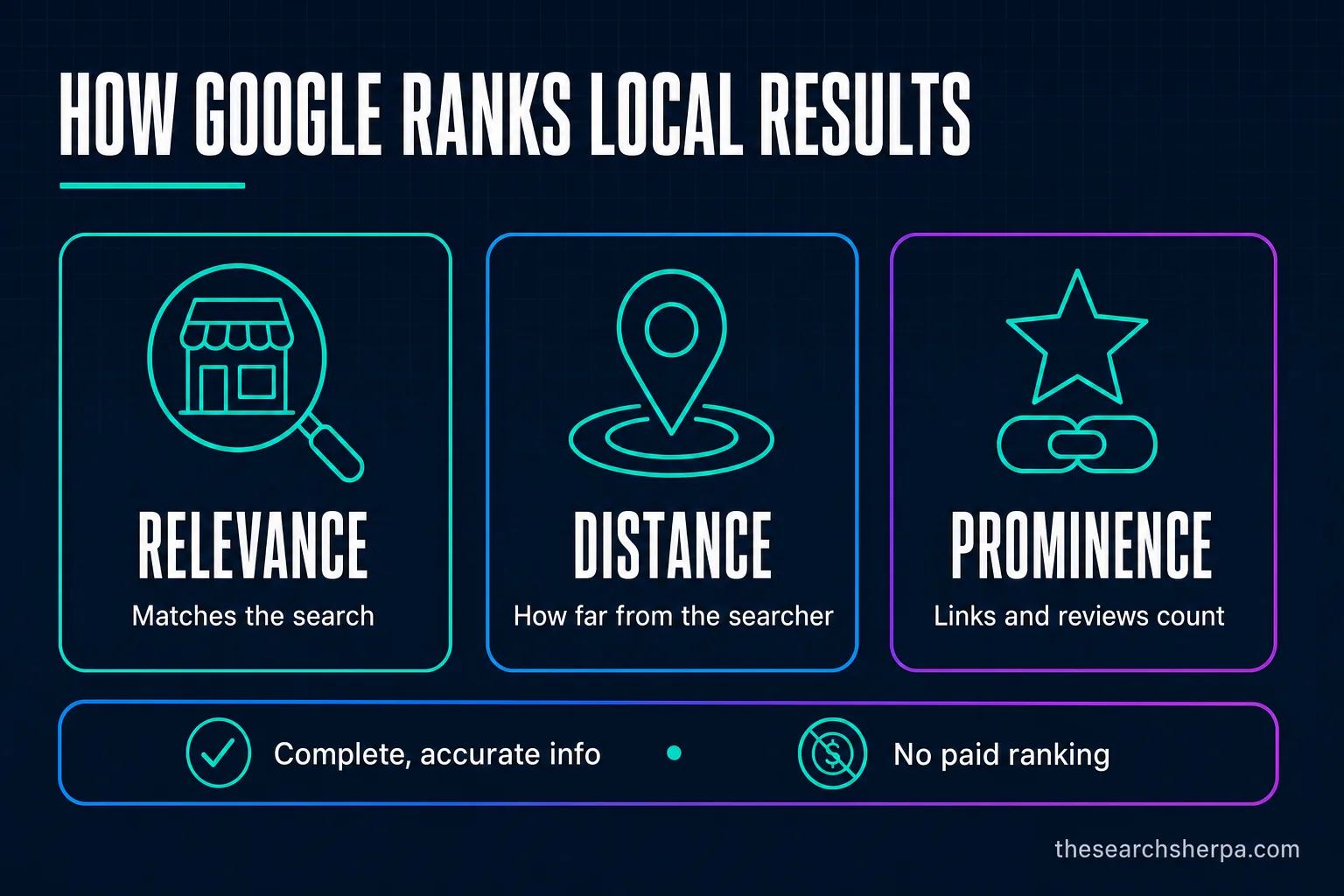
Google names three local ranking factors: relevance, how well your profile matches the search; distance, how far you are from the person searching; and prominence, how well known your business is. Businesses with complete and accurate info are more likely to show up, and there is no way to request or pay for a better local ranking.
That summary comes from Google’s tips to improve your local ranking, which says prominence is partly “based on info like how many websites link to your business and how many reviews you have.” Prominence builds from reviews, local link building, and the rest of your local SEO services work. A complete profile makes you eligible, accurate, and easier to choose.
How to verify your Google Business Profile (items 1 to 7)
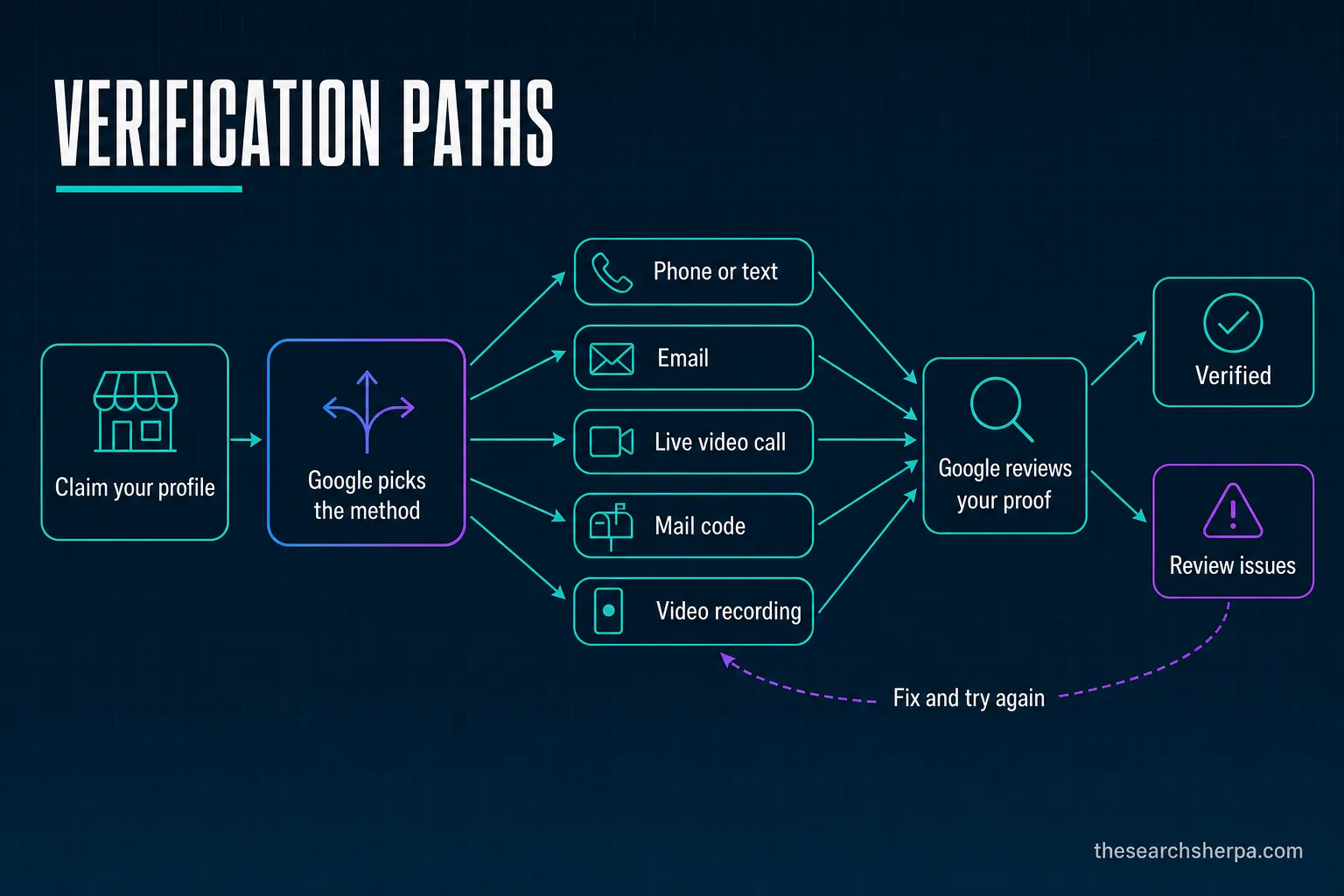
Google verifies a Business Profile with a method it picks for you: phone or text, email, a live video call, a mailed code, or a video recording. Google’s review can take as long as 5 business days, and most mailed codes arrive within 14 days. If your business is eligible for video verification, Google recommends it.
Verification gates everything else. Google says photos show up only after you verify, and performance data is available only for verified profiles. The table sums up Google’s verification help page and its video recording page.
| Method | When Google offers it | What to prepare |
|---|---|---|
| Phone or text | Google decides, based on business type, public info, region, or hours | A line you answer yourself. Interactive Voice Response (IVR) systems won’t get the code. |
| Google decides | Access to the inbox | |
| Live video call | Not for all businesses, and only within business hours | Be at your business, ready to show location, equipment, and proof you manage it |
| Not for all businesses | Most codes arrive within 14 days and expire after 30 | |
| Video recording | Eligible storefront, service-area, and hybrid businesses | One live, unedited mobile recording of at least 30 seconds |
| Instant | In some cases, such as a website verified in Google Search Console | Nothing extra |
1. Confirm your business is eligible
Google’s eligibility guidelines say a business “must make in-person contact with customers during its stated hours.” Lead generation agents, online-only businesses, P.O. boxes or remote mailboxes, and rental or for-sale properties do not qualify.
2. Claim it and take the method offered
Google says, “Verification methods are automatically determined by Google and can’t be changed.” You may need more than one method.
3. Choose video verification when offered
Google’s advice: “If your business is eligible for video verification, we recommend that you use this option.” It works for storefront, service-area, and hybrid businesses.
4. Record the video by Google’s rules
Google asks for “An unedited, unique, and complete recording with no breaks,” at least 30 seconds long, captured live, not pre-recorded, and uploaded from a mobile device through your Business Profile. Keep bank account, tax, or ID numbers and other people’s faces out of frame.
5. Show location, business, and management
For a storefront or hybrid business, show in one take your location (street signs, building numbers, or nearby businesses), your name on a permanent fixture, and proof of management, such as “things only an employee can access, like opening a cash register, kitchen, storage room, or using a point-of-sale system.”
A service-area business shows street signs or landmarks at its address, its tools, equipment, or branded apparel, and proof of management, such as opening its branded van or showing a permit, invoice, or utility bill in the profile’s name.
6. Wait, and change nothing meanwhile
Reviews can take as long as 5 business days, and “On rare occasions, reviews may take longer.” By mail, “Most codes arrive within 14 days,” and “Verification codes expire after 30 days.” While you wait for a mailed code, do not edit your name, address, or category, or request a new code. “Google will never ask for your verification code.”
7. Fix a failed attempt, and re-verify after edits
If Get verified reappears, Google could not completely verify you, so try again. A Review issues notice lists reasons such as “Business name not visible on storefront” or “No nearby area shown,” and you can record a new video. After you add or edit a category, Google says “you might be asked to verify your business again.”
Get the core business facts right (items 8 to 17)
8. Use your real-world business name
Google’s guidelines for representing your business want the name “as used consistently on your storefront, website, stationery, and as known to customers.” Leave out taglines, services, locations, and “irrelevant legal terms (e.g. LLC, LTD, INC)”; Google allows legal terms only with real-world proof, such as signage, that shows them consistently. Extra information in the name can lead to suspension.
9. Pick the most specific primary category
Google’s category help says, “The categories you select affect your local ranking on Google.” Choose what the business is. If the exact category isn’t listed, pick a general one.
10. Add only a few additional categories
Google says, “Use as few categories as possible to describe your overall core business from the provided list.” Add one only for a real department or service. Our guide on how to choose your Google Business Profile categories goes deeper.
11. Enter a precise address, or none
Use a precise, accurate address. Google says P.O. boxes or remote mailboxes “aren’t acceptable,” and a virtual office “isn’t eligible for a Business Profile.”
12. Pick storefront, service area, or hybrid
If you don’t serve customers at your address, hide it and list as a service-area business. Google’s video verification help adds that a business without permanent on-site signage belongs in that group. A hybrid serves customers at its address and at theirs.
13. Set the service areas you really serve
Google’s service-area help allows as many as 20 areas by city or postal code. “You can’t set your service area as a radius distance around your business,” and it should stay within about 2 hours of driving. Edits can take as long as 48 hours to show.
14. Keep one profile per location
Google says, “Do not create more than one page for each location of your business, either in a single account or multiple accounts.” A service-area business gets one profile for its whole area.
15. List a phone that reaches this location
Use a number “that connects to your individual business location,” a local line instead of a call center where possible, under the business’s direct control.
16. Link a page for this location
The same guideline lets a website stand in for the phone: “or provide a website that represents your individual business location.” With several locations, point each profile to its own location page.
17. Post your regular customer-facing hours
“Provide your regular customer-facing hours of operation.” Businesses that work only by appointment, or run varied schedules such as classes or showtimes, should not list hours.
Description, services, products, and attributes (items 18 to 23)
18. Write a plain description
Google’s page on editing your profile says, “Do not exceed 750 characters in the description field.” Say what you do, who you serve, and where, in your customers’ words.
19. Keep links and promotions out of it
“No links of any type are allowed,” and no URLs or HTML. Google’s examples of content that isn’t allowed include a store-wide sale and a best-bagels-in-town price claim.
20. List your services and prices
The menu and services editor has limited availability. Where you have it, keep your services, “along with their prices, accurate,” named the way customers search.
21. Keep the menu editor for food and drink
“The menu editor is for food and drink businesses only.” Everyone else lists services.
22. Add products only for physical goods
Google’s product editor help says the editor suits “a local store which sells physical goods,” and products that break policy can get all your uploads removed. Google’s edit page adds that retailers in the US, Canada, the UK, and Ireland can show in-store products automatically.
23. Set attributes, and check the ones customers add
Google’s attributes help says some attributes are yours to edit, and others “may be populated based on inputs from customers who visit your business.” A review of your edits “usually takes about 10 minutes,” and at most 30 days. Identity attributes, such as women-owned, can set you apart.
Photos and video (items 24 to 27)
24. Add a logo and a cover photo
Use your real logo and a cover photo of your real storefront, team, or work. Google’s photo and video help says they appear only after you verify.
25. Use the right photo files
Google lists JPG or PNG files from 10 KB to 5 MB, with 720 by 720 px recommended and 250 by 250 px as the minimum.
26. Keep photos true to life
Each photo “should be in focus and well lit, and have no significant alterations or excessive use of filters.” In Google’s words, “the image should represent reality.”
27. Keep profile videos short
Profile videos run 30 seconds or less, at 75 MB or less, in 720p or higher. The verification video in item 4 is different: it needs at least 30 seconds.
Posts, booking, chat, and Q&A (items 28 to 34)
28. Use the three post types
Google’s posts help describes three: updates, offers, and events. Pick the one that fits the news.
29. Point the button where customers act
Google says the button “should direct customers to a website where they can complete the action, like make a booking, order online, or learn more.”
30. Date your offers and events
“Posts older than 6 months are archived unless a date range is set.” Give offers and events their real dates.
31. Keep unverified contact details out of posts
Google’s content policy for posts says it may remove posts with unverified contact information, including phone numbers, email addresses, and social media handles.
32. Add booking through a provider or a link
Google’s booking help lets you connect a provider or add your own link. Providers appear within a week, but “Performance data isn’t available for custom links.”
33. Stop planning around in-profile chat
Google ended Business Profile chat on July 31, 2024, according to Google’s notice as a Product Expert quoted it in Google’s Help Community: “the chat feature is no longer available in your Business Profile.” Google’s chat help now lets verified profiles add WhatsApp or text messaging, but “Chat options are currently available for select regions.” With both, only text shows.
34. Answer the questions Google surfaces
On December 3, 2025, a Google employee announced in the Help Community that customers can “ask their question directly in Google Maps and get an updated, instant answer based on your answers and relevant reviews.” Owners answer aggregated questions and can still answer existing Q&A. Google’s edit page says Q&A “is available only for select business categories and regions.”
Reviews: ask every customer and stay inside Google’s policy (items 35 to 39)
Ask every customer for a review the same way and at the same point, never only the customers you expect to be happy. Google’s policy bars merchants from selectively soliciting positive reviews and from offering incentives for reviews. Psychologists, counselors, social workers, and other licensed healthcare providers follow their own professional codes first.
35. Create your review link or QR code
Google’s review link help lets you “create and share a link or QR code to request reviews” for receipts, thank you emails, or a QR code printed for your store. QR codes “can only be generated on a computer browser, not on mobile devices.”
36. Ask every customer, never by sentiment
Google’s Maps content policy prohibits merchants who “selectively solicit positive reviews from customers,” and lists “Merchants requesting that staff solicit a certain number of reviews.” Ask everyone the same way, with no staff quotas. Google’s review tips note, “A mix of positive and negative feedback often feels more trustworthy.”
Psychologists, counselors, and social workers answer to stricter codes. APA Ethics Code Standard 5.05, the 2014 ACA Code of Ethics (C.3.b), and the NASW Code of Ethics (4.07(b)) bar soliciting testimonials from current clients and others vulnerable to undue influence, and the ACA code adds former clients. Other licensed healthcare providers should check their own professional code and licensing board before setting up any review request. Because Google bars requesting specific content, never ask a patient to mention a diagnosis or treatment.
37. Never pay for a review or script it
Google prohibits incentives such as payment, discounts, or free goods for any review, and merchants should not “request that specific content be included.”
38. Reply promptly, without offers
The same tips say, “A prompt response shows that you value your customers’ feedback,” and advise against deals or promotions in replies. Our guide on how to get more Google reviews covers the routine, and our reputation and review management service can run it.
39. Expect no stars from your own reviews
Google’s review snippet documentation says self-serving reviews on LocalBusiness or Organization pages “are ineligible for star review feature,” embedded Google reviews included. Show reviews for readers.
Measure, respond, and handle a suspension (items 40 to 42)
40. Read the performance report monthly
Google’s performance help says the report can show searches, calls, website clicks, and direction requests, though “Not all metrics are available to you.”
41. Answer Google’s requests for more details
Google’s verification help says a request for more info to re-verify is “likely because some of your business details were recently updated,” and Google “might request more details or ask you to update your info.” Answer with your real details.
42. Appeal a suspension with evidence
Google’s help for suspended or disabled profiles says it may suspend profiles “that don’t follow our guidelines.” Appeal with evidence such as business registration, a business license, or tax certificates, submit the form within 60 minutes of opening it, and do not create a new profile meanwhile.
Frequently asked questions
Why am I unable to verify my Google Business Profile?
Google picks the verification method, and it can’t be changed, so the one you want may not be offered. A Review issues notice means your video was not accepted, for reasons such as no business name visible on the storefront. Your business may also be ineligible, because Google requires in-person contact with customers during stated hours.
How long does it take for Google to verify your business page?
Google says verification reviews can take as long as 5 business days, and on rare occasions longer. Most mailed codes arrive within 14 days and expire after 30 days. While you wait for a mailed code, do not edit your name, address, or category, or request a new code.
How much does it cost to verify your business on Google?
Nothing. Google says creating a Business Profile and listing your business on Google is free, and its verification help lists no fee. You pay only if you hire someone to handle setup and optimization.
Do you need an LLC to have a Google business profile?
No. Google’s eligibility guidelines and its guidelines for representing your business, as they read in October 2026, list no LLC or other legal entity requirement. They require in-person contact with customers during stated hours, and they say to leave “irrelevant legal terms (e.g. LLC, LTD, INC)” out of the business name unless real-world proof, such as signage, shows them consistently.
How to appeal a suspended Google Business Profile?
Appeal through Google’s help page for suspended or disabled profiles, with evidence such as business registration, a business license, or tax certificates. Submit the evidence form within 60 minutes of opening it, or it won’t attach. Do not create a new profile while the appeal is under review.
How much does it cost to optimize a Google My Business profile?
The profile is free under its current name, Google Business Profile, which Google announced in November 2021. If you hire help, our pricing page puts local business SEO, including Google Business Profile optimization, at $1,000 to $3,000 a month, starting with a $2,000 Custom SEO Roadmap credited toward your first month. Cost depends on your site, your competition, and your goals.
Get help with your profile
If you would rather hand this list to someone, our Google Business Profile management service works through it with you. The Search Sherpa is founder-led from Mokena, Illinois, and packages under $500 a month cannot sustain this work. Most local SEO shows measurable movement in about three to six months, depending on competition and the condition of your site. We do not promise rankings, lead counts, or map placements, because no honest provider can.
See how we price SEO and the Custom SEO Roadmap, contact The Search Sherpa with your business name and service area, or schedule a Digital Visibility Consultation. You can also call (217) 579-8791. No pressure, and no long-term lock-in contracts. If you are also weighing AI search, see our breakdown of AI search optimization cost.
Explore This Topic


Join Over 400,000 Entrepreneurs Getting Our Weekly Newsletter
Recent Posts

October 12, 2026
A YouTube demo shows only part of a provider’s work. Learn what to verify about AI review, access, backups, testing, ownership, and support

October 12, 2026
Watch a 129-second AI Dialogue about coding permissions, approval fatigue, and the risk of giving an AI agent control you cannot evaluate.

October 8, 2026
How to choose an SEO consultant in Chicago: consultant, agency, or freelancer, a decision tree, a vetting checklist, red flags, and rates in