

How much does Skool cost?
As of November 2026, Skool’s pricing page lists two plans. Hobby costs $9 a month and Pro costs $99 a month on monthly billing. On yearly billing, the same page shows $7.50 a month for Hobby and $82 a month for Pro.
The plan is only part of the bill. Skool also takes a fee on every payment your members make. As of November 2026, Skool’s payments FAQ puts that fee at 10% plus 30 cents on Hobby. On Pro it is 2.9% plus 30 cents for charges of $899 or less. Above $900, it is 3.9% plus 30 cents.
Skool also adds EU VAT on top of your price at checkout. It describes itself as the merchant of record. Both points answer most tax questions, and both have limits we cover below.
Skool can change its prices. Its Terms and Conditions allow Skool to change subscription fees on 30 days’ notice by email. We read every figure here on Skool’s own pages in November 2026. Check the live pages before you decide.
Hobby vs Pro: what the extra $90 a month buys
Both plans list unlimited members, courses, videos and live calls. The differences are the transaction fee and a short list of features that only Pro includes. The table shows Skool’s two plans as of November 2026.
| Skool plan detail | Hobby | Pro |
|---|---|---|
| Monthly billing | $9 a month | $99 a month |
| Yearly billing, price shown per month | $7.50 a month | $82 a month |
| Transaction fee | 10% plus 30 cents | 2.9% plus 30 cents ($899 or less); 3.9% plus 30 cents (above $900) |
| Custom URL | Not included | Included |
| Member affiliates | Not included | Included |
| Zapier integration | Not included | Included |
| Group ownership transfer | Upgrade to Pro first | Included |
Sources for the table: Skool’s pricing page, its payments FAQ, and its help articles on Zapier, member affiliates and ownership transfer, all as of November 2026.
The yearly figures are the per-month prices shown when you switch the pricing page to yearly billing. A “2 months free” banner sits above them. The page does not print an annual total, so confirm the charge at checkout.
Both plans start with a 14-day free trial, according to Skool’s payment terms and policy. After that, the plan fee is charged in advance and is not refundable. If you cancel, Skool says you keep access until the end of the billing period. The group is then archived and stays readable, but no new content can be added.
One Pro cost is easy to miss. Skool’s payment policy treats a URL change on Pro as a one-time purchase that is not refundable. We found no price for it on Skool’s pages.
How Skool’s transaction fee works
Skool charges its fee on each charge, not on your monthly total. Every charge carries a percentage plus a fixed 30 cents.
Skool’s pricing setup guide lists free groups, monthly or annual subscriptions, freemium, tiers and one-time payments. You can also sell one-time course purchases inside a group. Skool’s payments FAQ states its fee per paid transaction. It does not say how the fee applies to each pricing type, so check before you rely on one.
Skool’s payments FAQ gives its own examples. A $9 monthly membership pays out about $8.40 on Pro and $7.80 on Hobby. A $999 charge pays out $959.74 on Pro, because the 3.9% rate applies above $900.
The fixed 30 cents matters most on cheap memberships. By our arithmetic, Pro’s fee takes about 6.2% of a $9 charge, and Hobby’s takes about 13.3%. On a $100 charge, Pro’s fee is $3.20, or 3.2%. The lower your price, the bigger the share the fixed fee takes.
A few limits sit behind the fee. Skool says a single charge can be as large as $100,000, and all prices are in US dollars. The FAQ does not say which Pro rate applies between $899 and $900. Its payments FAQ also states that transaction fees are non-refundable. Refunds are covered further down, because another Skool page reads differently.
When does Pro become cheaper than Hobby?
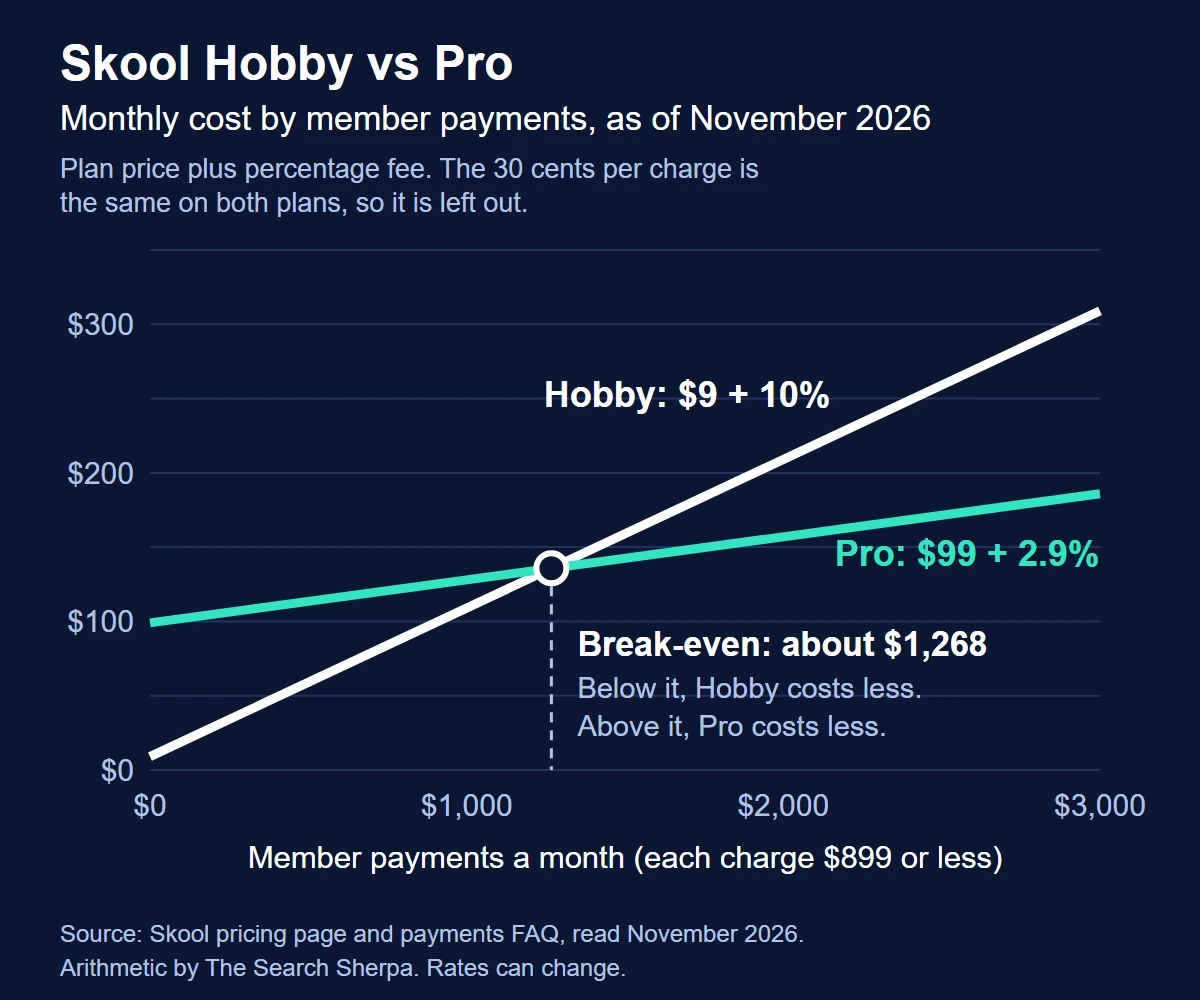
Pro costs $90 more a month than Hobby on monthly billing. On charges of $899 or less, its fee is 7.1 percentage points lower. The 30 cents is the same on both plans.
Our arithmetic uses Skool’s rates as of November 2026. Pro pays for itself once members pay you about $1,268 a month. Below that, Hobby costs less in plan and fees combined. Above it, Pro costs less. On yearly billing, using the per-month prices shown, the line falls to about $1,049 a month.
High-ticket sales move the line. Above $900 a charge, Pro’s rate is 3.9%, so the gap narrows to 6.1 points. If every sale is above $900, the break-even is about $1,475 a month. Pro-only features, such as Zapier or a custom URL, can also settle the choice before the fees do.
Three hypothetical monthly examples
These examples are hypothetical. They are not real communities or results. Each one adds the monthly plan price to Skool’s fee on every charge. We used the rates published as of November 2026.
| Hypothetical scenario | Member payments a month | Hobby: plan plus fees | Pro: plan plus fees |
|---|---|---|---|
| A fitness studio community: 40 members at $30 a month | $1,200 | $141.00 | $145.80 |
| A coaching group: 150 members at $49 a month | $7,350 | $789.00 | $357.15 |
| A one-time program: 10 sales at $1,500 | $15,000 | $1,512.00 | $687.00 |
The studio sits below the break-even, so Hobby is a few dollars cheaper. The coaching group pays about $432 less a month on Pro. The one-time program pays Pro’s 3.9% rate, because each sale is above $900.
The table leaves some costs out. VAT is not in it, because members pay VAT on top of your price. It also leaves out Growth Boost commissions, refunds, and any currency or bank fees. Those come next.
Does Skool charge Stripe fees on top?
No separate Stripe fee appears in Skool’s pricing. Skool’s payments FAQ says all payment processing happens on Skool’s own merchant. It uses a Stripe Express connection only to send your payouts.
You also cannot bring your own Stripe account. The same FAQ says Skool always creates a new Stripe Express account when you connect your bank.
Members pay by card through Skool’s checkout. As of November 2026, Skool’s Transaction Terms say card details go to third-party processors, including Stripe, Inc. They also say prices appear in US dollars only.
Skool’s FAQ argues that its Pro fee is cheaper than using Stripe directly. It says Stripe charges an additional 1.5% for international cards and 0.5% for subscriptions.
Stripe’s own pricing page reads a little differently as of November 2026. It lists 2.9% plus 30 cents for domestic cards. It adds 1.5% for international cards and 1% when currency conversion is needed. It lists Stripe Billing, its subscription product, at 0.7% of Billing volume. Each figure comes from its own company’s page, so compare them on the date you read them.
One more rule affects anyone tempted to take payments elsewhere. Skool’s Discovery FAQ lists “Payments off-platform” among the ranking penalties in Skool Discovery.
VAT, sales tax and merchant of record
This is general information, not tax or legal advice. Skool’s own VAT article carries a similar warning. Ask a tax adviser how these rules apply to you.
How Skool handles VAT
Skool’s payments FAQ says “Skool handles EU VAT for you.” It adds VAT on top of the price you set. Its example is a $100 monthly product sold to a member in Germany, which becomes $119 with 19% VAT. Skool collects that VAT and remits it.
Skool’s VAT FAQ adds the details, as of November 2026. The rate follows the member’s country and varies from 17% to 27%. You cannot switch VAT off or show VAT-inclusive prices.
VAT does not reduce your earnings, because it sits on top of your price. Skool says payouts are net payments and are not subject to VAT. A member with a valid VAT ID can enter it at checkout, which can change how VAT applies.
For the UK, Skool’s payments FAQ says it does not need to collect VAT. It says it is registered as a virtual training business, and that virtual training is VAT-exempt in the UK. That is Skool’s description of its own position.
What merchant of record means on Skool
Skool’s help center answers the question directly. Its VAT FAQ asks whether Skool is the merchant of record and answers, “Yes. Skool is MoR.” The payments FAQ says sales tax collection, filing and payments are “Skool’s responsibility, not yours.” It also says US groups do not have to track VAT for EU members.
Skool’s legal pages read differently in places. As of November 2026, its Terms and Conditions are marked effective July 1, 2023. They call payments between members and group owners contracts between those two parties. They say Skool is “not a party” to them.
The Terms also say the group owner “is also responsible for paying all applicable taxes for Services and/or Content.” That sentence sits in the section on the owner’s subscription payments to Skool, so it may not cover sales to members.
As of November 2026, the Transaction Terms describe Skool as a “payment intermediary.” In that role it collects, holds and processes member payments, then pays out what owners are due.
We have not tried to settle that difference for Skool. Read the help center and the Terms side by side, and ask your adviser which one governs your situation.
Your income tax is still yours
Neither page moves your income tax to Skool. Skool’s income reporting article explains when it sends a Form 1099-K for tax year 2025. It sends one to US creators who earned $20,000 or more from Skool across at least 200 transactions.
It also sends one when US federal tax was withheld, or when a state sets a lower threshold. Its list of lower-threshold states includes Illinois.
The IRS sets the federal rule in its Form 1099-K guidance. Payment apps and online marketplaces report payments over $20,000 in more than 200 transactions. They may also send a form for less. Either way, the IRS says you must report all income. Skool suggests adding up the net totals on your payout invoices.
Payouts, currency, refunds and chargebacks
Skool prices and charges members in US dollars, but it pays you in your local currency. A creator in the UK, for example, receives pounds. Skool’s Terms note that your bank may charge conversion or transfer fees.
Payouts run weekly. As of November 2026, Skool’s payments FAQ says your available balance is paid every Wednesday. US deposits usually take 1 to 3 business days, and international deposits 3 to 5.
The first payout goes through extra checks and can take as long as 14 days. If you run several communities, all payouts go to the same bank account. Skool issues a payout invoice for each payout.
Refunds are your decision. Skool lets creators refund members at their discretion. In most cases, it says, it will not refund on their behalf. Its refund guide adds that you cannot refund more than your available balance. A refund also does not cancel the member’s subscription.
Skool’s pages differ on what happens to the fee. The payments FAQ says “Transaction fees are non-refundable.” The refund guide says that on a full refund, “the Skool Network fees and/or VAT will be refunded from Skool’s balance.” Confirm with Skool support before you write your own refund policy.
Skool’s Terms add a rule for disputed payments. A member may win a refund or chargeback from their card provider. Skool may then investigate and deduct the matching earnings from your account. We found no chargeback fee amount on Skool’s pages.
One pricing rule protects existing members. If you raise your price, Skool keeps current members on the price they already pay.
Growth Boost: the 30% commission
Growth Boost is Skool’s paid promotion. It shows your community to likely members in Skool Discovery and in off-site ads. As of November 2026, Skool charges a 30% commission only on members it brings you. Members you bring yourself pay only the normal fees.
Two details affect the cost. Growth Boost is on by default, and you can switch it off at any time under SETTINGS, then Discovery. The commission also applies to recurring charges for as long as that member stays subscribed.
By our arithmetic, a $50 monthly member that Skool brought in pays you $33.25 a month on Pro. That is $50, less $15 in commission, less $1.75 in fees. On Hobby, the same member pays you $29.70.
What Skool’s price does not cover
Skool’s plan covers the community, courses and checkout. Other business tools sit outside it. Skool’s own Zapier guide shows how to send new paid members to “your CRM of choice.” Zapier works only on Pro.
Email and text follow-up, a sales pipeline and booking tools usually mean separate subscriptions. Plan for them when you set your price. If those systems matter to your business, think early about how you will connect a community to your CRM.
Other platforms pitch their fees against Skool’s. GoKollab says “Zero commissions” on its own site. That is a vendor’s marketing claim about its own platform, not an independent cost comparison. If you are still choosing a platform, read how Skool compares with GoHighLevel’s communities before you decide.
Skool pricing questions
How much does Skool take from creators?
As of November 2026, Pro takes 2.9% plus 30 cents on charges of $899 or less. Above $900, it takes 3.9% plus 30 cents. Hobby takes 10% plus 30 cents per charge. If Growth Boost brings you a member, Skool also keeps a 30% commission on that member’s payments.
Is there a yearly Skool plan?
Yes. As of November 2026, Skool’s pricing page shows yearly billing at $7.50 a month for Hobby and $82 a month for Pro. A “2 months free” banner sits above the prices. The page does not print the annual total, so confirm it at checkout.
Can I use my own Stripe account with Skool?
No. Skool’s payments FAQ says you cannot use an existing Stripe account. Skool processes member payments itself and creates a Stripe Express connection only to send your payouts.
Do I have to charge VAT on Skool?
Skool adds VAT to EU members’ payments at checkout and remits it, and creators cannot switch this off. VAT does not reduce your earnings, because it is added on top of your price. Income tax on what you earn is still your responsibility.
Does the Skool app cost money?
The app itself is free. As of November 2026, the Skool Communities app from Skool.com, Inc. is listed as free on the Apple App Store. Joining a paid group still costs whatever price that group’s owner sets.
Price the whole system, not just the plan
A Skool budget has four parts: the plan, the fee on each charge, Growth Boost if you leave it on, and the tools around the community. VAT is added for members rather than taken from you. Run your own numbers on Skool’s live pages before you set a price.
The Search Sherpa is a founder-led practice in Mokena, Illinois, and you work directly with Jeremy Bengtson. Is a paid community part of your local business? We can talk through the website, follow-up and search visibility around it. Book a Free Discovery Call to start that conversation.
Explore This Topic

SEO for Auto Repair Shops (2026): How Independent Shops Get Found

SEO for Real Estate Investors: How Motivated Sellers Find You
Vercel vs Netlify vs Cloudflare Pages: Which Free Plan Allows a Business Website?
Best Fonts for Medical and Healthcare Websites: Readable, Accessible, Licensed

Do You Still Need a Website If You Have a Google Business Profile?
Join Over 400,000 Entrepreneurs Getting Our Weekly Newsletter
Recent Posts
November 9, 2026
SEO for auto repair shops in 2026: Google Business Profile categories, repair pages, honest reviews, estimate and warranty copy, and what SEO costs.
November 8, 2026
SEO for real estate investors: build seller-situation pages, set up Google Business Profile within the rules, earn seller trust and track signed deals.
November 8, 2026
Vercel vs Netlify vs Cloudflare Pages for a business website: what each free plan’s terms say, what happens at the limit, and who