
By Jeremy Bengtson, founder of The Search Sherpa.
If you are choosing where to start an online community, Skool and GoHighLevel are the two platforms most people end up comparing. Skool’s Pro plan is $99 a month for one group and takes 2.9% plus 30 cents of each payment. GoHighLevel’s Starter plan is $97 a month, lists no transaction fee, and runs payments through your own processor. With 100 members paying $50, Skool Pro comes to $274 a month and HighLevel to about $307 once Stripe’s fees are counted. For most business owners, we still recommend GoHighLevel.
The reason is not the monthly price. For one community, Skool is a little cheaper. The difference is everything around the community: the contact records, the email and text follow-up, the courses, the checkout, and the ability to run more than one community without paying for each one. This guide walks through the real 2026 numbers, the honest trade-offs, and the cases where Skool is still the better pick.
A note before you read further. The Search Sherpa builds client automation in GoHighLevel, and we offer community owners a sub-account under our agency. That is a business interest, so the price and feature claims below link to their sources, the vendors’ own pages wherever one exists, and you can check each one yourself.
Skool vs GoHighLevel: which platform should you start your community on?
Choose GoHighLevel if your community is part of a business that also needs a CRM, email and text follow-up, courses with quizzes and certificates, or more than one community. Choose Skool if you want one self-contained community with the simplest possible setup and no automation to build. For a single community, Skool usually costs a little less each month; HighLevel pulls ahead with several communities or high-ticket sales.
Most people who search for a Skool alternative already like the idea of a paid community. What they run into is the wall around it: members who never get a follow-up email, a sales pipeline that lives in a different tool, and a second or third community that means a second or third bill. That wall is where the decision really gets made.
What each platform actually is
Skool is one closed community app
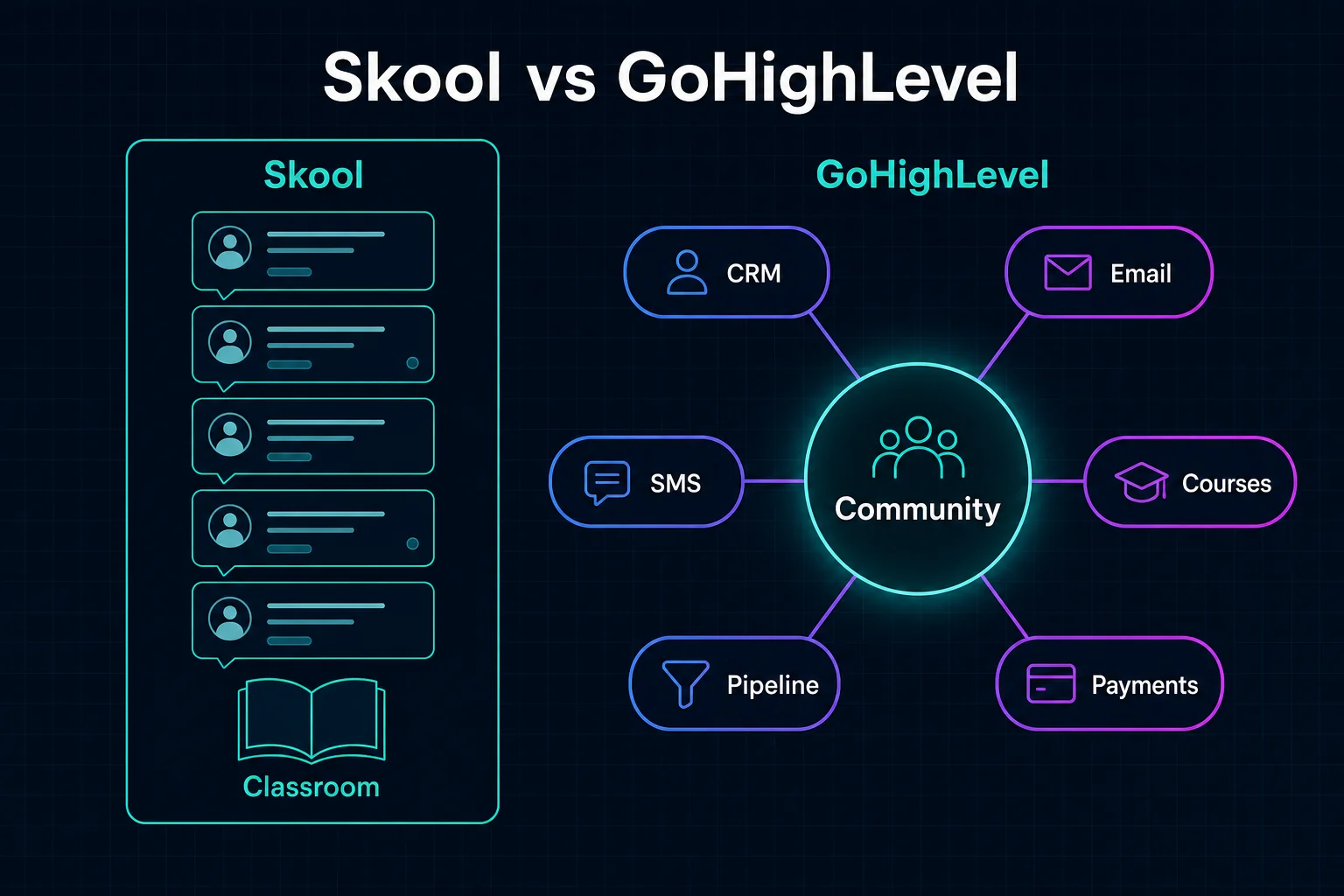
Skool puts everything in one interface. A group has a community feed, a Classroom for courses, a calendar, and a leaderboard. Skool also runs the checkout and acts as the merchant of record. Skool’s payments FAQ says Skool is responsible for all sales tax collection, filing, and payments, and that it handles EU VAT for you. That is a real advantage, and we come back to it below.
GoHighLevel is a CRM with a community built in
GoHighLevel, also called HighLevel or GHL, is a CRM and marketing platform. Communities and Courses are modules inside it, and every member is also a contact record in the CRM. Communities hold your groups, channels, events, and leaderboards. Courses, which HighLevel files under Memberships, hold lessons, quizzes, and certificates. The Client Portal is the login area your members use, and it can sit on your own domain. GoKollab is HighLevel’s public marketplace and member app, where communities can be listed for people to discover.
Skool vs GoHighLevel features, side by side
| Capability | Skool | GoHighLevel |
|---|---|---|
| Community layout | One main feed, plus Classroom and Calendar tabs | Groups with separate channels, including private channels |
| Gamification | 1 like earns 1 point, 9 levels, courses can open at a set level | 1 like earns 1 point, a maximum of 9 levels, badges; courses can open at a level, after a set time, or on purchase |
| Courses | Video, text, files, and drip release | Quizzes with passing grades, drip release, certificates issued by workflow, Certificate AI in beta |
| CRM and follow-up | No CRM or text messaging; admins can email a post to members once every 72 hours | Full CRM with email, text messaging, pipelines, and workflows |
| Integrations | Zapier on the Pro plan only; a webhook plugin for member invitations | Native workflow triggers for group access, posts, comments, events, and level changes |
| Payments and tax | Skool checkout; Skool is the merchant of record | Your own processor, such as Stripe, PayPal, NMI, Authorize.net, or Square; you are the merchant |
| Domain and app | Your group lives at a skool.com address; the Skool-branded app | Client Portal on your own domain; GoKollab app, or a branded member app sold through your agency |
| Discovery | Free Discovery listing; optional Growth Boost pays Skool a 30% commission, or more if you bid higher, on members it brings you | GoKollab marketplace, which advertises zero commissions |
Sources for the table: Skool’s points and levels guide, its Zapier integration page, and its Discovery FAQ. For HighLevel: its community gamification guide, its course quiz guide, its Certificate AI article, its payment providers guide, and its pricing guide.
What does each platform cost? Skool pricing vs GoHighLevel pricing
Skool has two plans. According to its pricing page and payments FAQ, Hobby is $9 a month and charges 10% plus 30 cents on every transaction. Pro is $99 a month and charges 2.9% plus 30 cents on transactions of $899 or less, and 3.9% plus 30 cents on transactions above $900. Skool’s fee already includes card processing. Each Skool plan covers one community; a Skool pricing review updated in September 2026 notes that a separate community needs another subscription.
HighLevel’s pricing page lists Starter at $97 a month, Unlimited at $297 a month, and Agency Pro at $497 a month. Starter includes three sub-accounts, and Unlimited includes unlimited sub-accounts. HighLevel lists no transaction fee on community or course sales. You pay your payment processor instead, and Stripe’s standard US rate is 2.9% plus 30 cents per successful domestic card charge.
| Monthly scenario | Skool Pro | Skool Hobby | HighLevel Starter |
|---|---|---|---|
| 1 community, 100 members at $50 | $274 | $539 | $307 |
| 1 community, 1,000 members at $50 | $1,849 | $5,309 | $2,197 |
| 5 communities, 100 members each at $50 | $1,370 | $2,695 | $1,147 |
| High-ticket program, 10 sales at $2,000 | $882 | $2,012 | $680 |
How we calculated these: the Skool columns are the plan price plus Skool’s fee on each charge. The HighLevel column is the Starter plan plus Stripe’s 2.9% and 30 cents on each charge, plus Stripe Billing‘s 0.7% of volume on the three recurring membership rows, because Stripe charges that fee on recurring subscriptions. A $50 charge costs $1.75 on Skool Pro and on Stripe, so 100 members cost $175 in card fees on either platform, and Stripe Billing adds $35 on HighLevel. A one-time $2,000 sale costs $78.30 on Skool Pro at the 3.9% rate, against $58.30 on Stripe, with no Billing fee. The five-community row puts five groups in one HighLevel account and five separate plans on Skool.
What the table leaves out
Four things move these numbers. First, card fees. Stripe adds 1.5% for international cards and 1% when currency conversion is needed, while Skool’s fee already covers processing. Second, usage. HighLevel’s pricing guide bills email at $0.675 per 1,000 emails and text messages at carrier rates, on top of the plan.
Third, tax. Skool collects and remits sales tax and EU VAT as the merchant of record. On HighLevel you are the seller. HighLevel’s international automatic taxes can calculate sales tax and VAT at checkout for the countries you set up, but its guide says complying with tax rules in each jurisdiction is your responsibility. If you sell to members in many countries, budget for an accountant.
Fourth, discovery. According to Skool’s Discovery FAQ, groups can appear in Discovery for free, and the optional Growth Boost shows your community to more people for a 30% commission, paid only when Skool gets you a member. Skool’s Growth Boost setting lets creators bid a larger share for more traffic. None of the rows above include that commission.
Where the price gap actually opens
For one community billed monthly, Skool Pro comes out slightly cheaper. The gap opens in three places: when you run several communities, when you sell anything above $900, and when you count the tools Skool needs beside it for email, text messages, and a CRM. If none of those apply to you, Skool is the lower bill, and the case for HighLevel rests on the system around the community.
Community experience: engagement, gamification, and structure
Skool’s strength is simplicity
Skool keeps members in one feed. Every like earns the author a point, points move members through nine levels, and an admin can set a course to open when a member reaches a level. All of that works the day you create the group, with nothing to configure. It gives members a reason to post and a reason to come back, and it is the part of Skool that is hardest to match. We will not pretend otherwise.
The same design has a cost. A single feed, even with categories and pinned posts, tends to favor recent posts over organized reference material, so answers to common questions can get buried as the group grows. For a small, fast-moving group that is fine. For a community that doubles as a support or training hub, it gets harder to manage.
How GoHighLevel communities work
HighLevel organizes a group into channels, more like Slack or Discord, so Wins, Questions, and Announcements each have their own space. Members can message each other through GoKollab Chats when they share a community. Gamification uses the same one-like, one-point rule, with a maximum of nine levels and custom badges. Courses can open at a set level, after a set time from joining, or on purchase, using HighLevel’s built-in course access options. Workflows add what happens around a level change, such as a message from you.
That means engagement in HighLevel has to be designed. For a new group, we recommend starting with three or four channels, not twelve, a weekly live session on the calendar, and workflow prompts that welcome each new member by name. Channels help a big community stay organized. In a new one, too many empty channels make the place feel deserted.
On phones, members can use the GoKollab app, published by LeadConnector on the App Store. You can also add a branded member app. HighLevel’s pricing guide lists it at $49 a month per sub-account to agencies, and the agency sets the price its clients pay. The business needs its own Apple and Google developer accounts, and HighLevel’s branded app setup guide says the app typically goes live in 7 to 10 working days.
Courses and memberships
Skool’s Classroom handles video, text, file downloads, and drip release. Its help center articles on Classroom content do not cover quizzes, graded assessments, or completion certificates. For a coaching program where the value is the live calls and the group, that is enough. For structured training, onboarding, or anything that needs proof a lesson was completed, it is thin.
HighLevel’s course builder adds single-choice and multiple-choice quizzes with an optional passing grade, drip release, and certificates. A certificate is issued by a workflow, for example the Lesson Completed trigger followed by the Issue Certificate action. HighLevel’s Certificate AI, which designs a certificate from a written prompt, is still in beta. Courses and the community share one login through the Client Portal, and HighLevel’s magic links let a member open Courses or Communities from a single link without typing a password.
Automation and CRM: the deciding difference
Skool has no CRM and no text messaging. Its Zapier integration is available only on the Pro plan, and its webhook plugin exists to automate member invitations from somewhere else. A welcome email sequence, a follow-up when someone abandons checkout, or a sales pipeline for your higher-priced offer all have to live in another tool, connected by Zapier.
In HighLevel, the community is already inside the CRM. Its group access triggers and post, comment, and event triggers include Group Access Granted, Group Access Revoked, Group Joining Request Rejected, Group Post Created, Group Comment Created, and Member Registered for Group Event. The gamification triggers add User Group Gamification Level Changed.
Here is what that looks like in practice. A new member joins, and a workflow sends a welcome email and text, tags the contact, and opens a task for you. A member registers for a live event, and the reminders go out on their own. A member comments on your offer post, and their card moves forward in your sales pipeline. A member reaches level three, and a congratulations message goes out as the next course opens. It is the same work we describe on our CRM automation and analytics integration page, applied to a community.
When Skool is still the better choice
We recommend GoHighLevel for most business owners, but not for everyone. Skool is the better choice if any of these matter most: you want one community and no other business systems, you sell to members in many countries and want Skool to file sales tax and EU VAT for you, you want Skool’s Discovery audience, or you want the lowest monthly bill for a single community.
Choosing GoHighLevel also means giving some things up. You give up Skool’s merchant-of-record tax filing and its one-screen simplicity. You also accept a steeper learning curve, because HighLevel is a whole business platform, not a single app. Those are the honest costs of the recommendation.
Moving from Skool to GoHighLevel
If you already run a Skool group, HighLevel’s Skool Importer brings members and their posts into a HighLevel community, and a later update added comment timestamps and the option to merge several Skool groups into one. You provide the group’s URL and an admin login. The importer builds a member list, and you fill in any missing email addresses before uploading it; members still missing an email fail to import, and their posts are skipped.
Two things do not move with the importer. Courses are rebuilt by hand in HighLevel. Paying members also have to subscribe again through your own checkout, because Skool is the merchant of record for their current subscriptions. Plan the switch with a clear notice, a firm date, and a reason for members to make the move.
One more limit is worth knowing. HighLevel snapshots copy workflows, membership offers, certificates, and quizzes into another account, but community groups are not on that list. The request to add groups to snapshots is marked as planned. Until it ships, each community’s channels are set up by hand.
Start your community in a sub-account under The Search Sherpa
A sub-account is a separate HighLevel account, with its own contacts, communities, courses, and workflows, created under an agency’s account. Instead of buying and configuring your own HighLevel plan, you can start in a sub-account under ours. Your members are contacts in your own sub-account, not in a shared list.
We set it up with you. We connect your payment processor, build your group and its first few channels, set up your first course and its checkout, and write the first workflows: the welcome sequence, the event reminders, and the course access rules that reward active members. If the community needs a sales page, our landing page design and conversion work covers it, and our answer engine optimization work helps AI search tools understand what your community offers. AI helps us work faster, it does not guarantee AI visibility.
Cost depends on your community, your setup, and your goals. We will be clear about pricing before any work begins. We do not promise member counts, revenue, or engagement, because no honest provider can. What we can do is build the system so your community, your contacts, and your follow-up work together from day one.
Frequently asked questions
Is Skool worth it?
Skool is worth it if you want one simple community with built-in gamification and you want Skool to handle sales tax and EU VAT as the merchant of record. The Pro plan costs $99 a month plus 2.9% and 30 cents per payment, rising to 3.9% on payments above $900. If you also need a CRM, email and text follow-up, or more than one community, the extra tools usually make GoHighLevel the better value.
How much does GoHighLevel cost per month?
HighLevel’s pricing page lists Starter at $97 a month, Unlimited at $297 a month, and Agency Pro at $497 a month. Starter includes three sub-accounts, and Unlimited includes unlimited sub-accounts. HighLevel lists no transaction fee on community or course sales, so you pay your payment processor instead, such as Stripe at 2.9% plus 30 cents per standard US card charge. Email and text messages are billed by usage on top of the plan. A sub-account under an agency is priced by that agency.
What is GoKollab?
GoKollab is HighLevel’s public marketplace and member app for communities and courses. Creators list communities there so new members can find them, members message each other through GoKollab Chats, and the site advertises zero commissions on what creators earn.
Is GoKollab the same as Skool?
No. Skool is a standalone community platform with its own checkout and its own Discovery page. GoKollab is the member-facing side of HighLevel communities, which sit on top of a CRM with email, text messaging, and workflows. Both help new members find a community, but Skool’s optional Growth Boost takes a 30% or higher commission on members it brings in, and GoKollab advertises zero commissions.
What are the downsides of GoHighLevel?
The learning curve is real. HighLevel is a whole business platform, so a community needs setup: channels, a checkout, and workflows for welcome messages and reminders. You also stay responsible for sales tax and VAT, because HighLevel is not the merchant of record; it can calculate tax at checkout, but filing and paying it remain your job.
Can I move my Skool community to GoHighLevel?
Yes, for members and posts. HighLevel’s Skool Importer brings in members and their posts using your Skool group URL and an admin login. It builds a member list, you fill in any missing email addresses, and members still missing an email fail to import, so their posts are skipped. Courses are rebuilt by hand, and paying members subscribe again through your new checkout, because Skool is the merchant of record for their current subscriptions.
Can members use a GoHighLevel community on their phone?
Yes. Members can use the GoKollab app, published by LeadConnector on the App Store, or you can add a branded member app through your agency. The business needs its own Apple and Google developer accounts, and HighLevel says the branded app typically goes live in 7 to 10 working days.
If your community is part of a business, start it where the rest of your business can reach it. Request a GoHighLevel sub-account for your community on our work with me page, or book a call there directly with Jeremy Bengtson. We will set up your community, your first course, and your first workflows with you, and we will be clear about pricing before any work begins.
Explore This Topic

Local SEO Cook County: South and Southwest Suburbs
Skool vs GoHighLevel: Where to Start Your Online Community in 2026

Chicago SEO Pricing (2026): What a Local Business Pays

Watch: Ask Customers for a Reddit Post, Not Just a Google Review
Reddit Marketing for Local Businesses: How Real Customer Posts Shape What AI Recommends
Join Over 400,000 Entrepreneurs Getting Our Weekly Newsletter
Recent Posts
September 29, 2026
Local SEO in south Cook County runs $1,000 to $3,000 a month. Orland Park, Tinley Park, and nearby suburbs.
September 28, 2026
Chicago SEO pricing in 2026: local firms pay $1,000 to $3,000 a month. See what moves a city quote.
September 28, 2026
Reddit marketing for a local business is not ads or posting about yourself. It is earning honest customer posts and taking part openly