

By Jeremy Bengtson, founder of The Search Sherpa.
A suspended Google Business Profile is one that Google has decided does not follow its guidelines. The fix Google describes has three parts. Make sure the profile follows the rules, add optional documents that support it, and submit one appeal through Google’s appeals tool.
This guide maps common causes to Google’s wording, lists the evidence Google names, and covers what not to do. It closes with examples for contractors who work from home in Will County. The Search Sherpa manages Business Profiles for local businesses from Mokena, Illinois.
What a suspended Google Business Profile means
Google suspends a Business Profile when it decides the profile does not follow its guidelines. Its help page says you can submit an appeal if you believe the profile should be reinstated. Fix the cause first, add optional evidence that matches the profile’s name and address, and appeal once through Google’s appeals tool.
Google’s help page on how to fix suspended or disabled profiles puts it in one line: “We may suspend or disable Business Profiles that don’t follow our guidelines.” When Google removes a profile, the same page says “The public can’t go to the profile.” A suspension is not the same as a profile that ranks lower. Live but hard to find? Read our guide on why a business stops showing up on Google.
Suspended, disabled, or restricted: the words Google uses
A profile can be suspended or disabled. A Google Account can be restricted, and that reaches every profile it manages. Google’s overview of Business Profile policies says “If a merchant’s account is restricted, all Business Profiles associated with that account will be suspended.” The fix page adds that a restricted account “won’t be able to create or claim other profiles.”
A rejected name edit or a restricted photo is a content restriction, and it follows a different route. Google’s page on appealing profile and content restrictions says a business outside the UK and EEA “must contact us” for those. You may also read about soft and hard suspensions. The Google help pages we read for this guide do not use those terms.
Why Google suspends Business Profiles
Google’s guidelines for representing your business open with a condition. “To make sure your Business Profile won’t be suspended,” you must avoid prohibited content, reflect your business accurately, and follow the product guidelines. The page also says Google “reserves the right to suspend access” when businesses violate them. Here is how the common causes map to that text.
Keywords, towns, or slogans in the business name
Google says “Your name should reflect your business’s real-world name, as used consistently on your storefront, website, stationery, and as known to customers.” It warns that “Including unnecessary information in your business name isn’t permitted, and could result in the suspension of your Business Profile.” Its examples rule out marketing taglines, service information, and location information. A plumbing company that adds Mokena water heater repair to its name breaks that rule.
The trade belongs in the category, not the name. Google says “Use as few categories as possible to describe your overall core business from the provided list.” Our guide to choosing Google Business Profile categories walks through that choice.
Virtual offices, shared offices, and P.O. boxes
An address you rent but do not work from does not qualify. Google calls it a virtual office and says “that location isn’t eligible for a Business Profile.” A co-working desk qualifies only if it “maintains clear signage, receives customers at the location during business hours, and is staffed during business hours by your business staff.”
P.O. boxes are stricter still. Google’s policy overview says “Merchants that set their business address at a P.O. Box will have their profile suspended.” It also says “If we determine that your business doesn’t exist in the location you claim, Google will disable your profile.”
A home address showing on a service-area profile
A business that travels to its customers is a service-area business in Google’s terms. The guidelines say “If you’re a service-area business, you should hide your business address from customers.” Google’s own example is a tradesperson: “if you’re a plumber and run your business from your residential address, clear the address from your Business Profile.”
A visible home address also runs into a signage rule. Google says “Businesses showing their address on Google should maintain permanent fixed signage of their business name at the address.” A house without a business sign does not meet that test.
More than one profile for the same business
Google’s page on duplicate profiles and ownership issues is direct: “You can have only one Business Profile for each business.” It says “If a profile is considered a duplicate, it won’t show on Google Search or Maps.” One profile per service is not allowed either. Google says to list your services on one profile instead.
There is an exception. Google allows one profile per location when a service business has “separate service areas and separate staff at each location.” If that is you, our notes on multi-location SEO cover the setup.

Account problems and who manages the profile
Sometimes the profile is fine and the account is not. Google says “If a merchant displays a pattern of violating Google Business Profile policies, they may have their Business Profile access restricted.”
Who manages the profile matters too. Google’s eligibility and ownership guidelines call a third-party SEO company that manages your profile an authorized representative. They set rules for those managers and warn that “Failure to adhere to these policies may result in a suspension for the Business Profile and/or Google Account.”
| Cause | What Google’s text says | What to fix before you appeal |
|---|---|---|
| Keywords, towns, or slogans in the name | Unnecessary information in the name “could result in the suspension” of the profile | Use the real-world name on your truck, invoices, and website |
| Virtual office or shared desk | A virtual office “isn’t eligible”; a co-working office needs signage, customers, and staff | Remove the address, or use a staffed location that meets the rule |
| P.O. box address | Profiles set at a P.O. box “will have their profile suspended” | Replace it with a real address or a service area |
| Home address shown on a service-area profile | A service-area business “should hide” its address | Clear the address and list the towns you serve |
| Duplicate profiles | “only one Business Profile for each business” | Remove the extra profile you created, and never open a new one |
| Restricted Google Account | Every profile on a restricted account is suspended | Appeal the account first, then the profile |
How to unsuspend a Google Business Profile: the appeal path
To unsuspend a Google Business Profile, open Google’s appeals tool while signed in to the account related to the profile. Select the profile and the decision, attach optional evidence, explain why it should be reinstated, and submit. Google says appeals can only be submitted once, and it emails you the decision.
Before you file, Google says to “Make sure your profile follows all the guidelines.” So fix the cause first. Remove the keyword from the name, clear the home address, or delete the duplicate you created. Our Business Profile optimization checklist walks through every field. Google’s appeals page also says to check your verification status first. If the profile was never verified, start with Google’s help page on verifying your business.
Google’s filing steps are short. Here they are in order, from the fix page:
- Open the appeals tool and confirm the Google Account related to the profile.
- Select the profile, then select the decision you want to appeal.
- Read the reason the tool shows and its link to the violated policy.
- Upload any optional evidence and type an explanation of why the profile should be reinstated.
- Tick the confirmation box and select Submit appeal.
Read the linked policy before you write a word. Keep the explanation factual: what was wrong, what you changed, and which documents prove the business. Google says “Appeals can only be submitted once,” and “We’ll review your appeal and send you an email with the appeal decision.”
The evidence Google lists
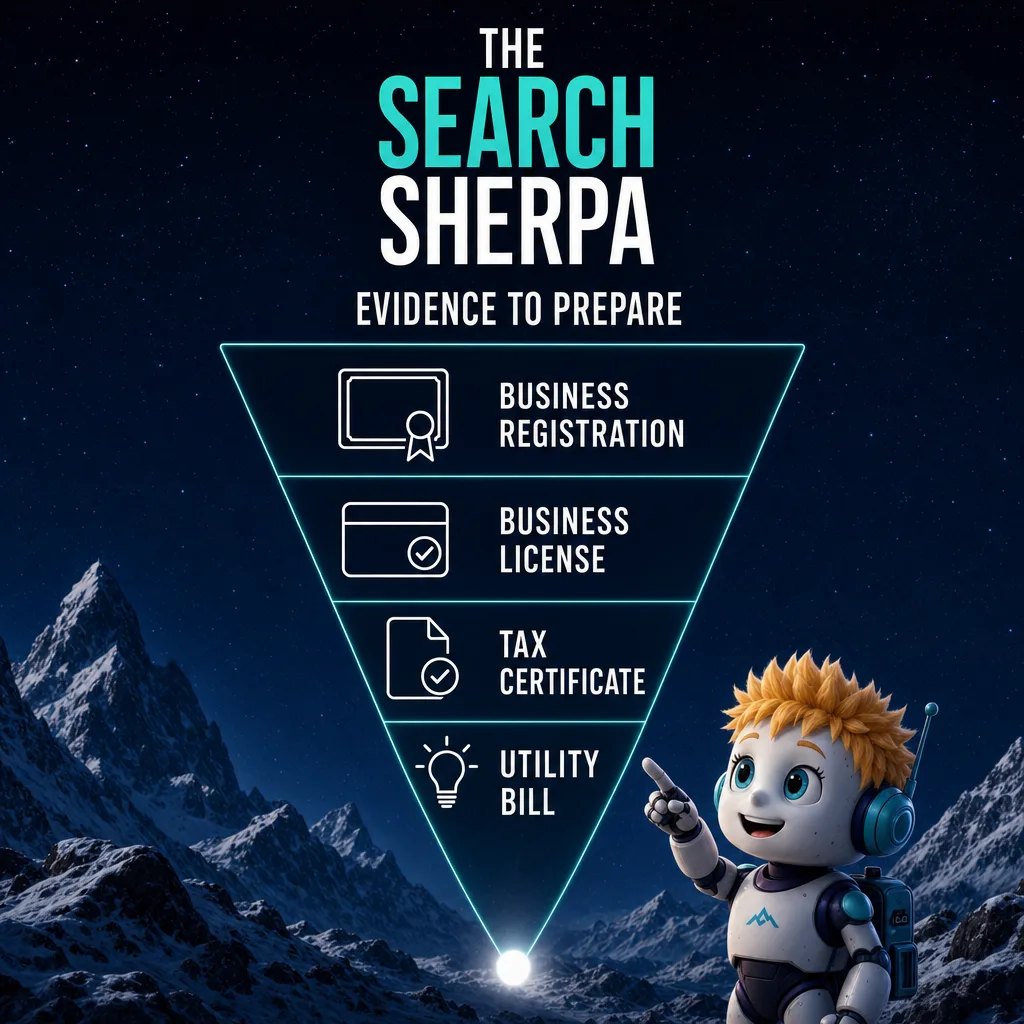
The appeals tool lets you attach optional evidence. Google’s fix page lists these examples of “Evidence that can help strengthen your appeal”:
- Official business registration
- A business license
- Tax certificates
- Utility bills for the business, such as electricity, phone, water, or internet
One rule decides whether those papers help. Google’s tip says “check that the business name and address match the profile you want to make an appeal for.” A license in your personal name may not support a profile under a trade name. Fix the profile or the paperwork until they agree.
If the appeal is denied, or the whole account is restricted
A denial is not always the end. If Google denies the appeal, its fix page says it may be able to do an additional review. You “can provide additional evidence that wasn’t added with your original appeal.”
An account restriction has its own order. Google says “To lift the restriction, you can provide a reason and submit an appeal for your account on your My accounts page.” Only then do you appeal the profile. In Google’s words, “Once the account restriction is lifted, to remove the Business Profile suspension, you can submit an appeal for your Business Profile.”
Suspension timelines: what Google does and does not say
Google’s help pages give no set length for a suspension. We did not find one on any Google page we read for this guide, so we will not guess. Treat any fixed recovery window you read elsewhere as a guess, not Google’s policy.
The only suspension timeline Google gives is for the appeal. Its appeals page says appeal reviews and decisions can take as long as five business days. It adds, “Do not submit multiple appeals for the same issue before receiving a decision.” Changing the service area has its own wait. Google’s service area help page says approved edits may take as long as 48 hours to show.
What not to do while your profile is suspended
A suspension is the wrong time to rush. Each of these mistakes runs against a line in Google’s own help pages:
- Do not create a new profile. Google says “Do not create a new Business Profile for the same business.”
- Do not file the same appeal again and again. Wait for the decision email.
- Do not rename the business or swap its category to get around the decision. Google says edits that attempt to significantly change the nature of a business are “often fraudulent.”
- Do not buy reviews to rebuild trust. Google bans “Reviews or ratings that have been paid for, directly or in kind.”
- Do not hand your login to anyone who will not tell you what they plan to change.
The review rule comes from Google’s prohibited and restricted content policy. Correct details and real customers rebuild a profile. A second profile never does.
Will County contractors who work from home
A plumber, electrician, or landscaper who works from home in Will County and drives to customers is a service-area business. Clear the home address, keep one profile, and list the towns you actually serve by name.
For a contractor based in Mokena, that might mean Frankfort, New Lenox, Tinley Park, and Orland Park. Google’s service area page says you “can’t set your service area as a radius distance around your business,” and that you can set as many as 20 service areas. The overall area “shouldn’t be more than about 2 hours of driving time from where your business is based.”
Paperwork that matches your profile
Local paperwork can back up the documents Google names. The Village of Mokena’s business license application says “All businesses located within the corporate limits are required to obtain a Business License, per Village ordinance.” Google lists a business license as appeal evidence. For a business in Mokena, that license is the kind of document Google names, as long as it carries the profile’s name and address.
Some villages register the contractors who work inside their limits. Mokena’s village code says “No person shall be a contractor within the village without first having registered therefor as herein provided.” New Lenox’s contractor registration page says “All contractors and subcontractors doing work within the Village must be registered with the Village.” Google’s evidence lists do not mention contractor registrations. Keep them on file, but lead with the documents Google lists.
The name rule ties back to your paperwork too. The Will County Clerk’s assumed business name page covers this. It says individuals using an assumed name “must file a certificate with their County Clerk registering their business name and the real names of the owners.” That duty comes from 805 ILCS 405/1. The clerk says LLCs and corporations “may need to register with the Illinois Secretary of State” instead. Use the name on that record for the profile, so the business registration Google lists matches it.
For the rest of a trade’s visibility, our guides to HVAC SEO, electrician SEO, and landscaper SEO cover each trade. Our broader guide to SEO for contractors covers the rest.
What Business Profile management costs
For a local contractor, SEO that includes Business Profile management usually costs $1,000 to $3,000 a month, the band we publish for local businesses. Before monthly work comes a one-time $2,000 roadmap, fully credited toward future services if you choose to move forward with us. Packages below $500 a month cannot sustain the work.
These figures come from our page on what SEO costs a local business in 2026. The roadmap has its own page, the Custom SEO Roadmap. Cost depends on your site, your competition, and your goals. We will be clear about pricing before any work begins.
Our pricing page also says what the local band covers. It names four kinds of work:
- Google Business Profile optimization
- Local citation cleanup
- Service-plus-city landing pages
- Targeted content built to capture customers in your immediate service area
After a suspension, the first item matters most. Our Google Business Profile management work keeps the name, address, service area, and categories inside Google’s rules. The reinstatement decision itself is Google’s alone. Our pricing page says most businesses see early ranking movement within three to six months of consistent work. For ranking movement once the profile is live and healthy, plan on about three to six months, depending on competition and the condition of your site. We do not promise rankings, lead counts, or map placements, because no honest provider can.
What to ask anyone who manages your profile
Google’s ownership rules give you the questions. Authorized representatives must “Never claim a Business Profile without express consent from the business owner.” They must “transfer Business Profile ownership to the business owner immediately upon request.” So ask any provider three things. Will I stay the owner while you are added as a manager? Will you tell me each change first? Will you hand back ownership the day I ask?
Frequently asked questions
How do I unsuspend my Google Business Profile?
Fix the cause first. Then submit an appeal through Google’s appeals tool while signed in to the account related to the profile. Select the profile and the decision, and attach optional evidence such as a business license or utility bill. Explain why it should be reinstated. Google says appeals can only be submitted once and emails you the decision.
Why is my Google Business Profile being suspended?
Google suspends profiles it decides do not follow its guidelines. Common causes include extra words in the business name and a virtual office or P.O. box address. Others are a home address shown on a service-area profile, duplicate profiles, and a restricted Google Account. The appeals tool shows the reason and links to the policy involved.
How long does a Google suspension last?
Google gives no set length for a suspension on the help pages we read. The only suspension timeline it states is for appeals: reviews and decisions can take as long as five business days. Google also says not to submit multiple appeals for the same issue before a decision. File once and wait for the email.
How do I get my Google account unsuspended?
If the problem is your Google Account rather than one profile, appeal the account first. Google’s help page says you can give a reason and submit an appeal on your My accounts page. Once the restriction is lifted, you then appeal the Business Profile suspension through the Google Business Profile appeals tool.
Should I make a new Google Business Profile if mine is suspended?
No. Google’s help page says do not create a new Business Profile for the same business. Its duplicates page says you can have only one profile for each business. A profile treated as a duplicate will not show on Google Search or Maps. Fix the original profile and appeal it instead.
Can a contractor who works from home have a Google Business Profile?
Yes. Google calls a business that travels to customers a service-area business. Its guidelines use a plumber working from a residential address as the example. That business should clear the address from the profile and list the towns it serves. Keep any village license or registration under the same name as the profile.
The Search Sherpa is a founder-led SEO practice in Mokena, Illinois, and you work directly with Jeremy Bengtson. If your Business Profile is suspended and you want to be easier to find, easier to understand, and easier to choose, Book a Free Discovery Call. You can also review SEO pricing for local businesses first, or call (217) 579-8791.
Explore This Topic
Google Business Profile Suspended? How to Appeal and What to Fix First
Google Business Profile Verification in 2026: Methods, Delays and Fixes

SEO for Auto Repair Shops (2026): How Independent Shops Get Found
SEO for Real Estate Investors: How Motivated Sellers Find You
Vercel vs Netlify vs Cloudflare Pages: Which Free Plan Allows a Business Website?
Join Over 400,000 Entrepreneurs Getting Our Weekly Newsletter
Recent Posts
November 10, 2026
Google Business Profile verification in 2026: the methods Google offers, why checks stall, what to fix first, and how home-based businesses verify.
November 9, 2026
SEO for auto repair shops in 2026: Google Business Profile categories, repair pages, honest reviews, estimate and warranty copy, and what SEO costs.
November 8, 2026
SEO for real estate investors: build seller-situation pages, set up Google Business Profile within the rules, earn seller trust and track signed deals.