

By Jeremy Bengtson, founder of The Search Sherpa.
Multi-location SEO is local SEO run once for every location you operate. Each place gets its own page on your website, its own Google Business Profile, its own consistent listings and its own reviews, all under one brand. The most common way it goes wrong is the duplicate location-page trap. A business opens its second or third location, copies the first location page, swaps in the new town name and publishes. The pages now say nearly the same thing, and Google groups pages like that and chooses one of them as the canonical.
This guide is for owners and operators with two or more physical locations. Franchise systems are one kind of multi-location business, but this is not a franchise playbook.
What is multi-location SEO?
Multi-location SEO is the work of making every physical location of one business findable in local search on its own. Each location gets a page with its own address, hours, team and photos, one verified Google Business Profile, listings that match that page, and its own reviews. Reporting is then split by location, so you can see which places are growing and which need work.
The work multiplies, but the content cannot be copied. Two locations need two pages, two profiles, two sets of listings and two streams of reviews. Google’s guide to improving your local ranking says “Local results are mainly based on relevance, distance, and popularity.” Distance, in Google’s words, is “how far each business is from the customer who’s searching.”
Our local SEO services page describes one visibility system: the profile, consistent listings, reviews, local content and structured data, all confirming the same facts. Multi-location SEO runs that system once per location, under one brand. For the single-location basics, start with our practical guide to local SEO services.
The duplicate location-page trap
When the next locations open, someone duplicates the first page and changes the town, the street address and the phone number. Every other sentence stays the same.
Google’s documentation on URL canonicalization explains what happens next: “If Google finds multiple pages that seem to be the same or the primary content very similar, it clusters them together.” Google then chooses one of them as the canonical, and “A Google Search result usually points to the canonical page.” Canonical tags are covered in technical SEO and duplicate URLs.
There is a worse version. Google’s spam policies for web search list as abuse “Having multiple domain names or pages targeted at specific regions or cities that funnel users to one page” and “Creating substantially similar pages that are closer to search results than a clearly defined, browseable hierarchy.” The fix is not fewer location pages. It is location pages that each carry facts only that location has.
What makes a location page worth indexing
The practical guide linked above puts it plainly: “Service and location pages need real local proof (photos, names, outcomes), not boilerplate copy pasted across neighborhoods.” Here is the difference, element by element.
| Element | Copied template page | Real location page |
|---|---|---|
| Address and hours | Town name swapped in | The location’s own address, hours and holiday hours |
| Phone | The main office number | A local number that rings at that location |
| Team | No names | The manager and staff who work there |
| Photos | Stock or headquarters photos | Photos taken at that location |
| Services | Everything the brand offers | Only the services this location actually offers |
| Directions | Missing | Landmarks, parking and access |
| Links | Only to the homepage | To its profile, its booking page and nearby locations |
Before any location page goes live, check it against this list:
- One URL per location, in a consistent pattern such as /locations/town-name/.
- The business name customers see there, the full street address and a local phone number.
- Hours, including holiday hours, that match the location’s Google Business Profile.
- At least one paragraph only that location could have: the neighborhood, the parking, the people.
- One clear way to call, book or visit that location.
- LocalBusiness structured data that describes that one location.
How to structure a multi-location website
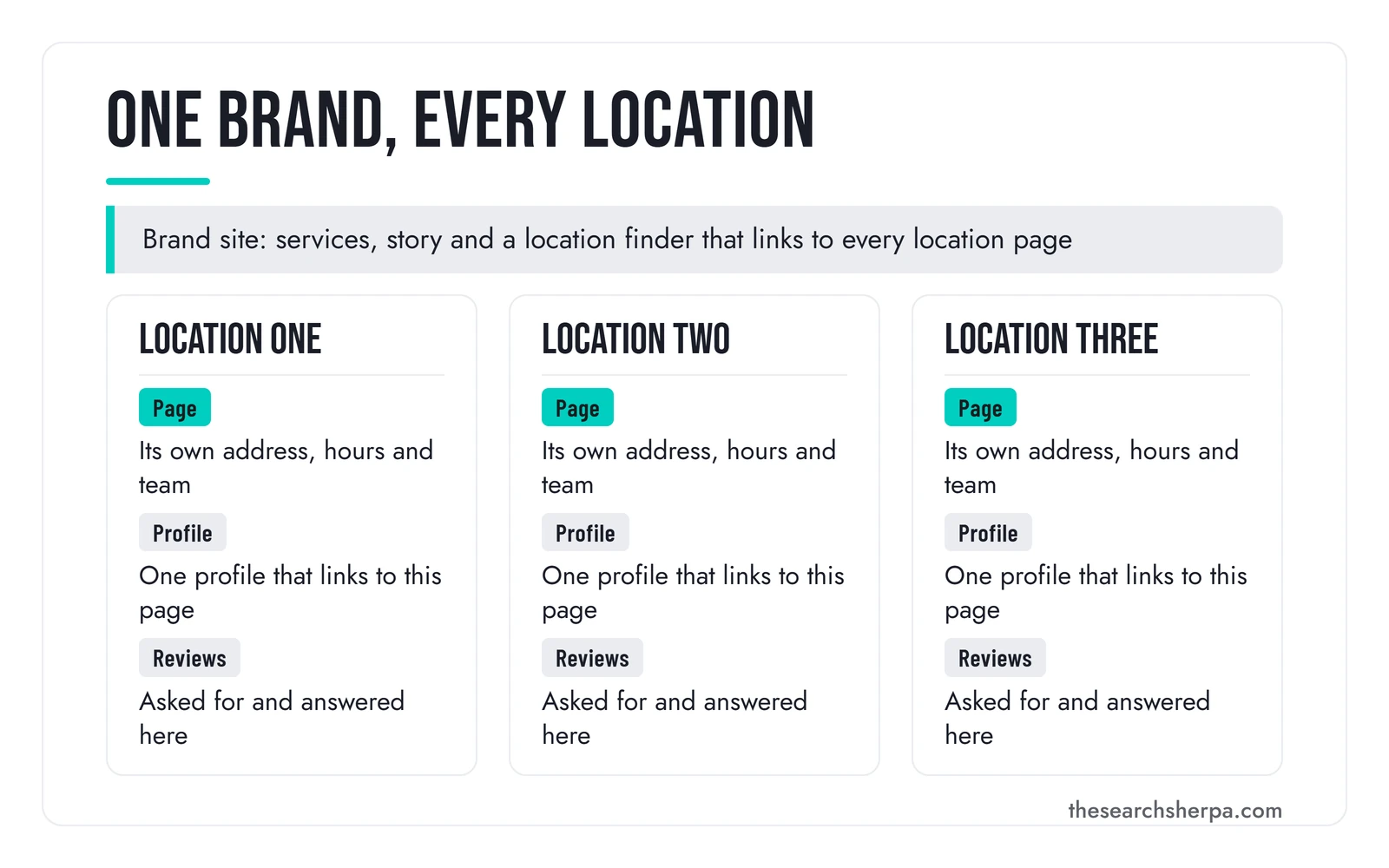
The location page system is simple to draw. One brand site sits at the top: your services, your story and a location finder. Under it, each location has one page. That page is tied to the location’s Google Business Profile, the profile and listings point back to the page, and the location’s reviews live on its profile.
One domain with every location under it is usually cleaner than a separate website for each location. Separate sites spread your links across several domains, multiply the upkeep, and invite the near-copies that Google’s spam policies describe. One of their examples is “multiple websites with slight variations to the URL and home page.” The main exception is a location that runs under a different name as its own brand.
Link the system in both directions. The homepage and a locations index link to every location page, and each location page links back to your main service pages and across to your nearest other locations. Each profile’s website link goes to that location’s own page rather than the homepage, which fits Google’s guidance, covered in the next section, that a profile’s website should represent the individual location.
Titles, links and schema for each location page
Give each location page its own title tag. Our guide to local SEO title tags and meta descriptions gives the pattern for a branch location page as “[Service] in [Branch City, ST] | [Business]” and says a homepage for several locations should leave “city detail to branch pages.” It also warns that “Copying one title across many pages makes them hard to tell apart.”
Google’s documentation on LocalBusiness structured data says to “Define each local business location as a LocalBusiness type” and to “Use the most specific LocalBusiness sub-type possible.” Keep the name, address and phone in the markup identical to the page and the profile.
One Google Business Profile per eligible location
Google allows one Business Profile for each eligible location, and a location is eligible only if it makes in-person contact with customers during its stated hours. Every location of a chain uses the same business name unless its real-world name varies, and the same category when it provides the same service. With 10 or more eligible profiles of the same business, you can ask Google to verify them in bulk.

Every rule in this section comes from Google Business Profile Help.
Which locations qualify
Google’s business eligibility and ownership guidelines set the test: “To qualify for a Business Profile, a business must make in-person contact with customers during its stated hours.” A storefront, an office that receives customers, or a staffed base that sends crews out can qualify. A rented mailing address cannot.
Google’s guidelines for representing your business on Google say a virtual office “isn’t eligible for a Business Profile,” and a co-working office qualifies only if it “maintains clear signage, receives customers at the location during business hours, and is staffed during business hours by your business staff.” They also state the one-profile rule: “Do not create more than one page for each location of your business, either in a single account or multiple accounts.” Service businesses get a matching allowance: “If you have different locations for your service business, with separate service areas and separate staff at each location, you’re allowed one profile for each location.” Local SEO for law firms applies the virtual-office, co-working, and one-profile rules to attorneys.
Names, categories, phones and links
For chains, those guidelines ask for consistency: “All locations must have the same name unless the business’s real world representation consistently varies from location to location. All locations must also have the same category if they provide the same service.” The town does not go in the name. Our guide to choosing Google Business Profile categories covers the category itself. Doctors with their own profiles follow separate naming rules; see SEO for medical practices.
Each profile also needs its own contact details. The guidelines ask for “a phone number that connects to your individual business location, or provide a website that represents your individual business location,” and say to “Use a local phone number instead of a central call center helpline number whenever possible.” Google’s business links policies apply the same idea to booking and ordering links: “For businesses with multiple locations, action links must lead to a website for a specific location.”
Store codes, business groups and bulk verification
Three tools in Business Profile Manager keep many profiles manageable. The first is store codes: “Before you can import your spreadsheet, each location must have a unique store code.” Keep each code stable. For a bulk spreadsheet upload, Google warns that “If you add or change a store code to an existing location, it will create a duplicate location.”
The second is business groups, which Google describes as “like a shared folder for your profiles,” so several people can manage the same profiles without sharing a password. Ownership should stay with the business: Google’s eligibility guidelines ask authorized representatives to encourage the owner to “own the Business Profile, and add authorized representatives as managers.”
The third is bulk verification, which requires that “Your spreadsheet has 10 or more profiles from the same business.” Google adds that “Duplicate, suspended, or disabled profiles don’t count towards the 10 Business Profile minimum” and that “Agencies with more than one business in one account can’t bulk verify.” That page lists “Your business isn’t a service-area business” as a condition, and Google’s page on bulk verification delays narrows it: service-area businesses “may bulk verify only if their locations are also customer-facing during regular hours.” Without enough eligible profiles, Google’s advice is to “verify your profile individually instead.” Our Google Business Profile management page covers the ongoing work on each profile.
Listings and reviews for each location
Directory listings work like the profile: one listing per location, with the same name, address and phone as that location’s page. When a location moves or changes its number, every listing for it changes too.
Other platforms have their own location tools. Microsoft’s announcement of the new Bing Places for Business says “We’ve made major improvements to how business owners import listings from Google.” Apple’s guide to adding a location in Apple Business places locations under Brands, then Locations, and warns that “If the location you entered is already claimed by another organization, you’ll see a note” saying so.
Consistency is what lets search engines connect a location’s listings, profile and page as one place. Our guide to brand entity optimization explains why one consistent identity matters.
Reviews belong to the location that earned them. Google’s local ranking guide says “More reviews and positive ratings can help your business’s local ranking.” Each profile collects its own reviews, so a new location needs its own review requests.
Ask every customer the same way, at every location. Google’s Maps user content policy prohibits incentives for reviews, and says businesses may not “Discourage or prohibit negative reviews, or selectively solicit positive reviews from customers.” That rules out sending the review link only to customers you expect to be happy. Our guide on how to get more Google reviews covers the review link, the QR code and the rules. The same guide adds: “Then reply to the reviews that come in.”
Reporting by location
A brand-wide traffic chart hides the question you need answered: which locations are growing and which are not.
Google’s help page on Business Profile performance says “You can access performance information for individual or multiple profiles,” including calls, website clicks, direction requests and the searches people used. One caution from the same page: “Performance data includes views, searches, and actions from both organic search results and Google Ads.” If a location runs ads, its profile numbers are not purely organic. We do not sell ads management; we mention it so the numbers get read correctly.
A good provider reports each location against its own starting point: profile calls, direction requests, website clicks and organic clicks to that location’s page, over the same date range each month. Our guide on how to track local SEO performance says that for a single-location small business, Google’s free profile and search reports “beat a paid geo-grid until you have more than one location or a wide service area.”
How to choose a multi-location SEO provider
Choose a provider who builds a distinct page for each location, sets up one compliant Google Business Profile per eligible location that your business owns, keeps listings and reviews separate by location, and reports each location against its own baseline. Before you sign, ask how they keep location pages from copying each other.
Our checklist of what to look for in a local SEO company covers the general questions. These are the multi-location ones.
| Question to ask | A good answer | A red flag |
|---|---|---|
| How will each location page differ? | Each page gets facts only that location has | One template with the town name swapped |
| Who owns the Google Business Profiles? | The business, with the provider added as a manager | The provider, or no clear answer |
| Where does each profile’s website link point? | To that location’s own page | To the homepage for every location |
| What about an address that does not qualify? | It explains Google’s rules and leaves it off | A profile for any address, even a virtual office |
| How will the report split by location? | Calls, directions and page clicks per location | One brand-wide traffic number |
What multi-location SEO costs
Cost depends on your site, your competition, and your goals. The checklist page above adds that it also depends on “how many locations you have.” Each location adds a page to build, a profile to clean up, listings to correct and reviews to keep coming.
Our SEO pricing page puts local businesses at $1,000 to $3,000 a month, “where most small businesses and single-location practices start.” It describes the $3,000 to $8,000 a month band as “Right for businesses with multiple locations or competitive regional markets.” Before any monthly retainer comes a diagnostic: every engagement begins with a $2,000 Custom SEO Roadmap, credited fully toward your first month of retainer services if you continue. SEO packages priced below $500 per month “cannot sustain the labor-intensive work required for legitimate organic growth.”
We do not publish a per-location price. Profile work for several branches is quoted per location, as our breakdown of Google Business Profile management pricing explains, but the total depends on how many pages and profiles need work and how competitive each market is.
Red flags in a multi-location proposal
- Dozens of near-identical city pages with nothing specific to say about each place.
- Profiles at addresses where no one meets customers, such as a virtual office or a mailbox.
- Unnecessary words, such as a town name, added to a profile name, which Google’s guidelines say “isn’t permitted, and could result in the suspension of your Business Profile.”
- Review requests sent only to happy customers, or any reward offered for a review.
- A promised top map position for every location.
We do not promise rankings, lead counts, or map placements for any location, because no honest provider can. Google says so itself: “There’s no way to request or pay for a better local ranking on Google.”
Frequently asked questions
Do I need a separate page for each location?
Yes, for every location that serves customers in person. Each page needs that location’s own address, hours, team, photos and services, and it is where that location’s Google Business Profile should link. One page listing every address gives each profile nowhere specific to point.
Can one Google Business Profile cover all my locations?
No. Google allows one profile for each eligible location and says not to create more than one page for each location. Every location that makes in-person contact with customers during its stated hours gets its own profile, normally with the same business name as the others.
Should each location have its own website?
Usually not. One brand domain with a page for each location keeps your links and upkeep in one place and avoids the near-copy websites that Google’s spam policies warn about. The main exception is a location that runs under a different name as its own brand.
How many locations do I need for bulk verification?
Google offers bulk verification when your spreadsheet has 10 or more profiles from the same business. Duplicate, suspended or disabled profiles do not count toward that minimum, and an agency account holding more than one business cannot bulk verify. Service-area businesses may bulk verify only if their locations are also customer-facing during regular hours. Without 10 eligible profiles, each profile is verified individually.
How long does multi-location SEO take?
Most businesses see early ranking movement within three to six months of consistent work, and each location moves on its own schedule. A new location with few reviews in a crowded market usually takes longer than an established one.
How much does multi-location SEO cost?
Cost depends on your site, your competition, and your goals, and on how many locations you have. Our pricing page puts local businesses at $1,000 to $3,000 a month and describes the $3,000 to $8,000 a month band as right for businesses with multiple locations or competitive regional markets. Every engagement begins with a $2,000 Custom SEO Roadmap, credited toward your first month if you continue.
Is SEO still worth it in 2026?
For a business with several physical locations, usually yes. People still search for a business near them, and Google still ranks local results mainly on relevance, distance and popularity, so each location can earn its own place. It is the wrong spend if your locations cannot take more calls, or if you need results this month rather than in three to six months.
Get a plan for every location
See how we price SEO and the Custom SEO Roadmap, or contact The Search Sherpa with your locations and the markets you want to grow. You can also call (217) 579-8791. We are a founder-led local SEO consultancy in Mokena, Illinois, and you work directly with Jeremy Bengtson. No pressure and no contract.
Explore This Topic

Hiring an SEO Consultant Chicago Businesses Can Trust

On-Page SEO Services: Improving the Pages You Already Have

Landscaping SEO for Landscapers: Two Kinds of Buyer, Two Kinds of Search

SEO Audit Services: A Prioritized Plan, Not a List of Problems
Multi-Location SEO: Local SEO for Businesses With Two or More Locations
Join Over 400,000 Entrepreneurs Getting Our Weekly Newsletter
Recent Posts
October 8, 2026
How to choose an SEO consultant in Chicago: consultant, agency, or freelancer, a decision tree, a vetting checklist, red flags, and rates in
October 8, 2026
On-page SEO services improve the pages you already have: titles, headings, copy, links, alt text, and schema. What is included, how it runs,
October 8, 2026
Landscaping SEO builds the pages and Google Business Profile work behind lawn care contracts and design-build projects. What it includes and costs.