

By Jeremy Bengtson, founder of The Search Sherpa.
To get more Google reviews, ask every customer the same way, soon after the visit, and send a link or QR code that opens your review form. Then reply to the reviews that come in. Never choose who gets asked by how you think they will rate you, and never offer anything for a review. Google’s policy forbids both.
Asking works. In BrightLocal’s Local Consumer Review Survey 2026 of 1,002 US adults, 83% of people asked to leave a review went on to leave one. That is a survey answer, not measured behavior, but it makes a strong case for asking as a habit.
We rewrote this guide in October 2026 with Google’s current review link steps, a corrected compliance section, and rules for licensed healthcare providers. For a short version, watch our video on Google review habits.
We do not promise rankings, lead counts, or map placements, because no honest provider can. Google’s help page on local results says the same about its own system: “There’s no way to request or pay for a better local ranking on Google.”
How do you get more Google reviews?
Ask every customer for an honest review the same way, soon after the visit, with the link or QR code from your Google Business Profile, and reply to the reviews that come in. Do not screen who gets asked, ask for a rating, or offer anything in return. Therapists, counselors, and other licensed healthcare providers check their professional code first.
Each habit below gets its own section later:
- Ask everyone. Send the same request to every customer, so nobody is picked by mood.
- Ask soon. Make the request part of closing out each visit.
- Remove the search. Send the review link or QR code Google gives you.
- Reply. Answer reviews briefly and personally.
- Offer nothing. No discounts, gifts, or prize entries, and no request for a rating or for particular words.
Reviews also matter for local search. The same Google page says prominence is based partly on “how many reviews you have,” and that “More reviews and positive ratings can help your business’s local ranking.” It does not name recency or reply rate as ranking inputs, so neither do we.
What customers say about reviews in 2026
BrightLocal published its 2026 survey on February 11, 2026. It ran on SurveyMonkey with 1,002 US adults, and BrightLocal sells local SEO services. These are stated preferences, so read them as direction, not proof.
| What consumers told BrightLocal in 2026 | Share |
|---|---|
| Read reviews for local businesses | 97% |
| Won’t use a business that has fewer than 20 reviews | 47% |
| Only care about reviews written in the last three months | 74% |
| Were asked to leave feedback in the past 12 months | 78% |
| Of those asked to leave a review, went on to leave one | 83% |
| Expect business owners to respond to reviews | 89% |
| Unlikely to choose a business with templated or generic responses | 50% |
Two figures matter for planning. With 74% saying they only care about reviews from the last three months, make the ask part of every visit. And 47% say they won’t use a business with fewer than 20 reviews.
How do I find my Google reviews link?
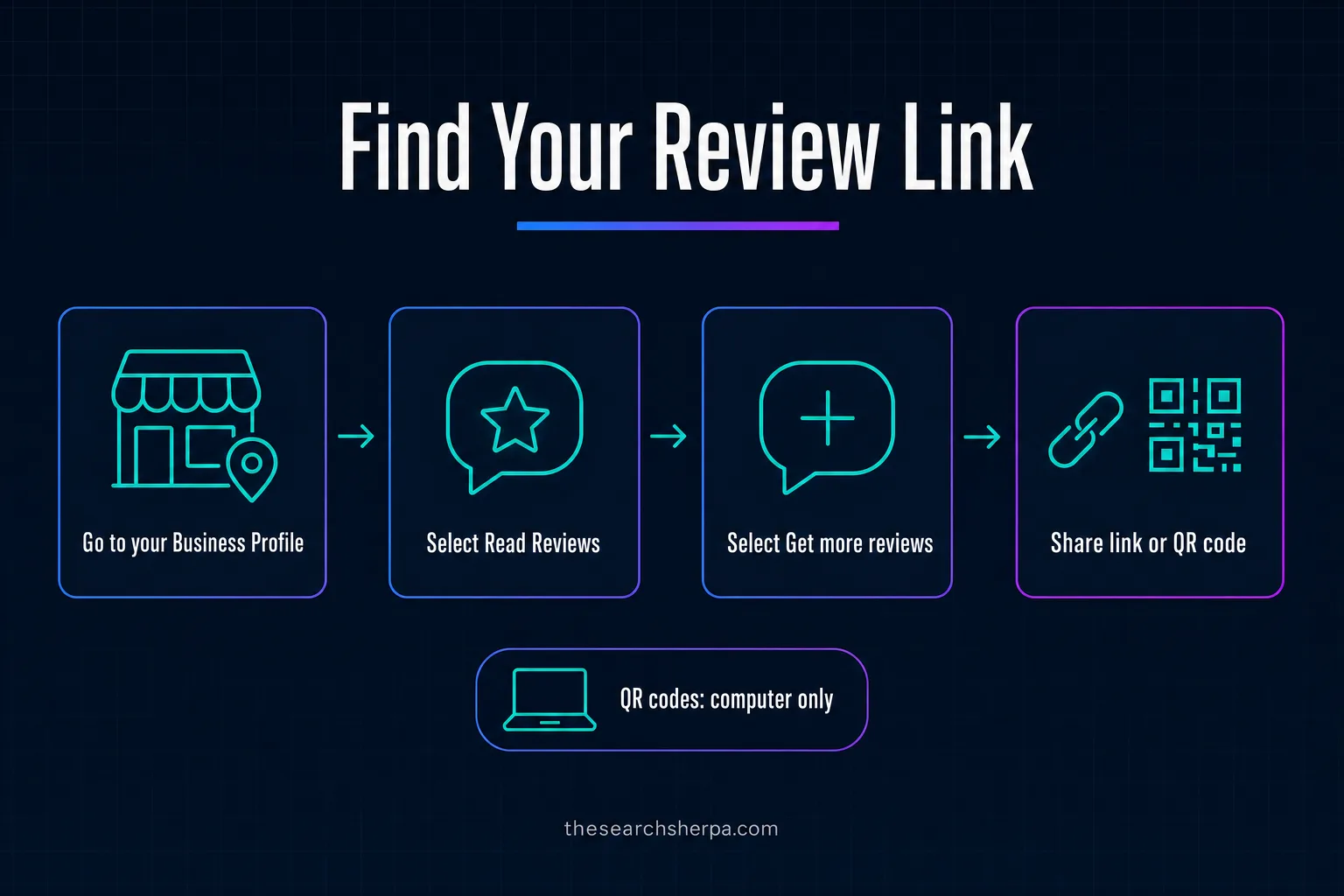
Google’s current steps come from its Business Profile help page on review links and QR codes, which says you can “create and share a link or QR code to request reviews.” The steps:
- Go to your Business Profile.
- Select Read Reviews, then Get more reviews.
- To copy the review link, select Copy.
- Or share the link or QR code directly, or use the other sharing options Google shows.
Google adds one limit: “Currently, reviews QR codes can only be generated on a computer browser, not on mobile devices.” So make your QR code at a desk. The first version of this guide named an Ask for reviews button. Google’s page now says Get more reviews.
Where to put your review link and QR code
Google suggests sending requests “through email, WhatsApp message, or Facebook post,” and lists four places for the link or the printed code:
- On your receipts.
- In thank-you emails.
- At the end of a chat interaction.
- As a printed QR code displayed in your store.
Per Google’s tips for getting more reviews, “Customers must be signed into a Google Account to leave a review. They can set one up with a non-Gmail email address.”
If you text the link, check consent first. The FCC’s consumer guide to unwanted calls and texts says its rules “require a caller to obtain your oral or written consent before making an autodialed or prerecorded call or text to your wireless number.” Whether a review request is a commercial or an informational text is a question for your advisor.
A link is only as good as the profile it opens, so work through our Google Business Profile optimization checklist and our guide to choosing Google Business Profile categories.
How to ask every customer the same way
A system means nobody decides who gets asked. Every customer gets the same request, through the same channel, at the same point after the visit. Google’s Maps policy on fake engagement allows merchants to “Solicit or encourage the posting of content that does represent a genuine experience, without offering incentives to do so or attempting to influence the rating or the contents of the review.”
A request template with no screening
Keep the message short, neutral, and the same for everyone:
Hi [first name], thank you for choosing us today. If you have a moment, we would welcome your honest review on Google. Here is the link: [link]
It asks for an honest review, not a five-star one. It drops “if you were happy,” which the first version of this guide used and which screens people by mood. Google bars merchants from trying to “selectively solicit positive reviews from customers.” And it asks for no particular words, since Google says merchants should not “request that specific content be included.”
Timing, the counter mention, and your staff
Make the ask automatic, so your booking or point-of-sale system sends it the same way every time. A spoken mention at the counter is fine if it stays a mention. Google says “merchants should not require or pressure users to leave ratings or write reviews while on the premises.” Therapists and other licensed healthcare providers should skip the counter mention and read the section on professional codes first.
Google also does not allow “Merchants requesting that staff solicit a certain number of reviews,” or reviews “that include specific content, including content that identifies a staff member.” So no quotas, and no asking customers to name an employee. The FTC’s guide to soliciting and paying for online reviews adds: “Don’t ask your staff to write reviews of your business, at least not without ensuring that they disclose in their review that you employ them and asked them to write it.”
Therapists, counselors, and healthcare providers: check your code first
If you are a therapist, counselor, social worker, or other licensed healthcare provider, your professional code and your licensing board come before any review playbook, including this one. The APA, ACA, and NASW codes each limit soliciting testimonials from current clients and from others vulnerable to undue influence, and the ACA code also names former clients.
The ask-everyone habit does not carry over to every profession. Three codes, in their own words:
The APA Ethics Code, Standard 5.05: “Psychologists do not solicit testimonials from current therapy clients/patients or other persons who because of their particular circumstances are vulnerable to undue influence.”
The 2014 ACA Code of Ethics, Standard C.3.b, as quoted in the ACA’s Counseling Today: “Counselors who use testimonials do not solicit them from current clients, former clients, or any other persons who may be vulnerable to undue influence. Counselors discuss with clients the implications of and obtain permission for the use of any testimonial.”
The NASW Code of Ethics, Standard 4.07(b): “Social workers should not engage in solicitation of testimonial endorsements (including solicitation of consent to use a client’s prior statement as a testimonial endorsement) from current clients or from other people who, because of their particular circumstances, are vulnerable to undue influence.”
Whether a Google review request counts as a testimonial is for your code and your board to decide. A code can be stricter than Google, and the stricter rule binds you. Depending on your code and board, the answer may be a general, non-targeted invitation or no request at all. Our guide to therapist SEO cost and the ethics rules behind it covers building trust without a review push.
Replies are a privacy question for covered practices
Replies carry their own risk for practices covered by HIPAA. HHS’s Office for Civil Rights announced a settlement with Manasa Health Center, a New Jersey provider of adult and child psychiatric services, over a complaint that it disclosed a patient’s protected health information when it “posted a response to the patient’s negative online review.” In a separate settlement with a dental practice, OCR described “the provider’s inappropriate use of social media to respond to patient reviews, disclosing protected health information.”
Both settlements concerned replies to patient reviews that OCR said disclosed protected health information. Whether a particular reply is permissible is a HIPAA question for your counsel.
This is marketing guidance, not legal advice. Confirm any handling of patient data with the counsel or compliance advisor who supports your practice.
What Google and the FTC each prohibit
Google’s policy is what bans review gating and every incentive for a Google review. The FTC’s rule, in effect since October 21, 2024, covers fake reviews, including buying and selling them, and rewards tied to a particular sentiment. FTC staff add that asking only happy customers could still violate the FTC Act.
The first version of this guide said the FTC’s rule outlawed review gating and all review incentives. That was wrong. For Google reviews, the stricter rulebook is Google’s own.
Google’s rules
Google’s Maps policy says merchants may not offer incentives, “such as payment, discounts, free goods and/or services,” in exchange for posting any review or for revising or removing a negative one. It bars merchants from trying to “Discourage or prohibit negative reviews, or selectively solicit positive reviews from customers,” and lists “Reviews or ratings that have been paid for, directly or in kind” as fake engagement.
The FTC’s rule
The FTC announced its final rule on August 14, 2024, saying it “will combat fake reviews and testimonials by prohibiting their sale or purchase.” The rule went into effect on October 21, 2024, and FTC staff note that it “authorizes courts to impose civil penalties for knowing violations.” The rule text at 16 CFR 465.4 makes it a violation “to provide compensation or other incentives in exchange for, or conditioned expressly or by implication on, the writing or creation of consumer reviews expressing a particular sentiment, whether positive or negative.”
The rule does not ban gating or every incentive. On asking only happy customers, FTC staff answer: “The rule does not contain a specific prohibition against such conduct. But this practice could violate the FTC Act.” Staff add that the rule “does not prohibit giving incentives for reviews, as long as there isn’t an express or implied requirement that the reviews have to express a particular sentiment,” though “failing to disclose incentives could be a violation of the FTC Act.”
| Practice | Google review policy | FTC rule and staff guidance | Our advice |
|---|---|---|---|
| Ask every customer the same way, nothing offered | Allowed | Consistent with the FTC’s guide for marketers | Do it |
| Ask only customers you think are happy | Not allowed | No specific ban in the rule; staff say it could violate the FTC Act | Never |
| A discount or gift for any review | Not allowed | Banned by the rule only if tied to a sentiment; undisclosed incentives could violate the FTC Act | Never |
| Reward only positive reviews | Not allowed | Banned by the rule | Never |
| Buy reviews | Not allowed | The rule prohibits the sale or purchase of fake reviews | Never |
The FTC’s guide also warns: “Some SEO and reputation management companies say they can boost your customer reviews and ratings. Make sure you know what they’re really doing.” That includes agencies like ours, so ask any provider to show you the exact message.
How to respond to reviews, good and bad
Google’s local results page notes: “When you reply to customer reviews, it shows that you value their feedback. Positive reviews and helpful replies can help your business stand out.” In BrightLocal’s survey, 89% said they expect business owners to respond, and 81% expect a response within a week.
Google’s tips page gives five habits worth keeping:
- Keep it short. “If a reply is too long, people might stop reading before they get to the main point.”
- Stay conversational. Avoid using a reply “to offer deals or promotions.”
- Protect privacy. “Never share a reviewer’s private information or engage in personal attacks.”
- Take hard cases offline. Google suggests you “politely request that the reviewer contact you via phone or email to resolve the issue privately.”
- Answer promptly. “A prompt response shows that you value your customers’ feedback and are committed to high-quality service.”
For a negative review, answer calmly, say what you will do, and move the details to a call or an email. Skip the canned script: 50% of BrightLocal’s respondents said templated or generic responses make them unlikely to choose a business.
An honest complaint is not a disaster. Google’s tips page says “A mix of positive and negative feedback often feels more trustworthy.” If replies are the part that slips, see how our reputation and review management service works and what reputation management pricing looks like.
Build the review system once, then keep it running
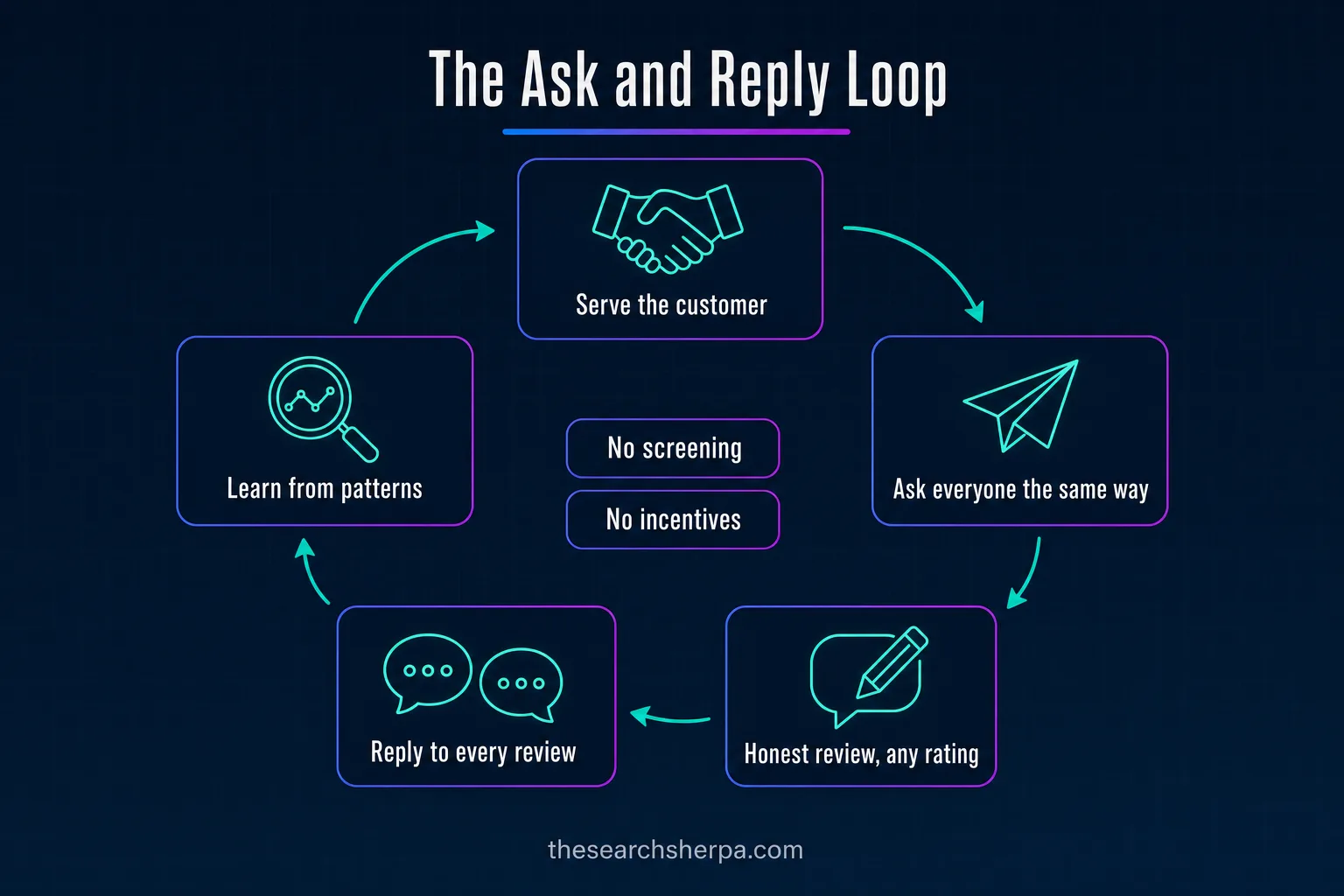
A review system has four parts, and each one replaces a decision someone would otherwise forget:
- One request for everyone. Your booking or point-of-sale system sends it after each visit, with texting consent in place. Licensed healthcare providers check their code first.
- One link. Your review link or QR code goes in the message, on receipts, and at the counter.
- A reply to every review. A person answers each one, briefly and without a template.
- A regular read. Someone reads reviews for repeated praise and complaints.
Steady Google Business Profile management and sound local SEO give each review a profile worth landing on. If you are missing from the map, read why a business is not showing up on Google, and our guide to tracking local SEO performance shows whether the system is working.
Some owners want help building it. Cost depends on your site, your competition, and your goals. Our SEO pricing page puts SEO for local businesses at $1,000 to $3,000 a month, with a $2,000 Custom SEO Roadmap credited toward the first month. Our pricing page says most businesses see early ranking movement within three to six months of consistent work. That window, three to six months, depending on competition and the condition of your site, is a planning range, not a promise, and reviews are only one part of it.
Frequently asked questions
How do I find my Google reviews link?
Go to your Business Profile, select Read Reviews, then Get more reviews, and select Copy to copy the review link. The same screen lets you share the link or a QR code directly. Review QR codes can only be generated on a computer browser.
How can I get more 5-star Google reviews?
Ask every customer for an honest review, the same way, and let the ratings fall where they fall. Google bars incentives, attempts to influence the rating, and selectively soliciting positive reviews, so there is no compliant way to ask for five stars. What you control is the service and the habit of asking.
Is it legal to buy Google reviews?
No. Buying fake reviews violates the FTC’s rule on consumer reviews, which the agency described as prohibiting their sale or purchase, and courts can impose civil penalties for knowing violations. Google also treats paid reviews as fake engagement.
Can you pay for 5 star reviews?
No. The FTC’s rule makes it a violation to provide compensation or other incentives conditioned on reviews expressing a particular sentiment, positive or negative. Google goes further and strictly prohibits any incentive, like free or discounted goods or services, in exchange for reviews.
Can Google detect fake reviews?
The Google pages we read do not explain how it finds fake reviews, so we will not guess. They do say that reviews must reflect a genuine experience, that paid reviews count as fake engagement, and that incentives for reviews are strictly prohibited. Earn every review from a real customer.
How to get 1000 reviews on Google?
Google does not allow staff review quotas, incentives, or selective asking, so build the habit of asking every customer, every time. Licensed healthcare providers check their professional code before asking anyone.
If you want your business to be easier to find, easier to understand, and easier to choose, start with a conversation, with no pressure. Read what SEO costs in 2026, or request a website and SEO review. The Search Sherpa is founder-led from Mokena, Illinois, and you can call (217) 579-8791.
Explore This Topic


Join Over 400,000 Entrepreneurs Getting Our Weekly Newsletter
Recent Posts
October 15, 2026
SEO for property management in 2026: reach rental owners with a Google Business Profile, area pages, Fair Housing-safe copy, honest reviews, and cost.

October 15, 2026
SEO for insurance agencies in 2026: Google Business Profile setup, line and town pages, honest reviews, ad-rule checks, and what local SEO costs.

October 12, 2026
A YouTube demo shows only part of a provider’s work. Learn what to verify about AI review, access, backups, testing, ownership, and support