

By Jeremy Bengtson, founder of The Search Sherpa.
Technical SEO services find and fix the site-wide problems that stop Google from crawling, rendering, indexing, and showing your pages. The work covers robots.txt files and XML sitemaps, JavaScript rendering, canonical tags and duplicate URLs, site speed and Core Web Vitals, structured data templates, redirects, and site migrations.
A page Google cannot crawl, render, and index cannot rank, however good the writing is. With The Search Sherpa, the work starts with a $2,000 Custom SEO Roadmap that is credited toward your first month, then continues on a monthly retainer.
What are technical SEO services?
Technical SEO services fix the parts of a website that decide whether Google can reach, read, and store its pages. That means crawl access, rendering, indexing rules, canonical URLs, sitemaps, speed, structured data templates, and redirects. Content and links only pay off once those parts work.
Google describes its own process plainly. Its guide to how Google Search works says “Google Search works in three stages, and not all pages make it through each stage.” Those stages are crawling, indexing, and serving results. Rendering happens during the crawl, when Google runs the page’s JavaScript in a recent version of Chrome.
Technical SEO is the site-wide part of that work: the server, the templates, and the settings every page inherits. Titles, headings, and copy are on-page SEO, and links from other sites are off-page SEO. A technical problem can cancel out both.
Where pages get stuck: crawl, render, index, and serve
Google usually has to crawl, render, and index a page before it can show it. A robots.txt block is the exception: the URL can still appear, without a description. Content that does not match a search fails that search only.
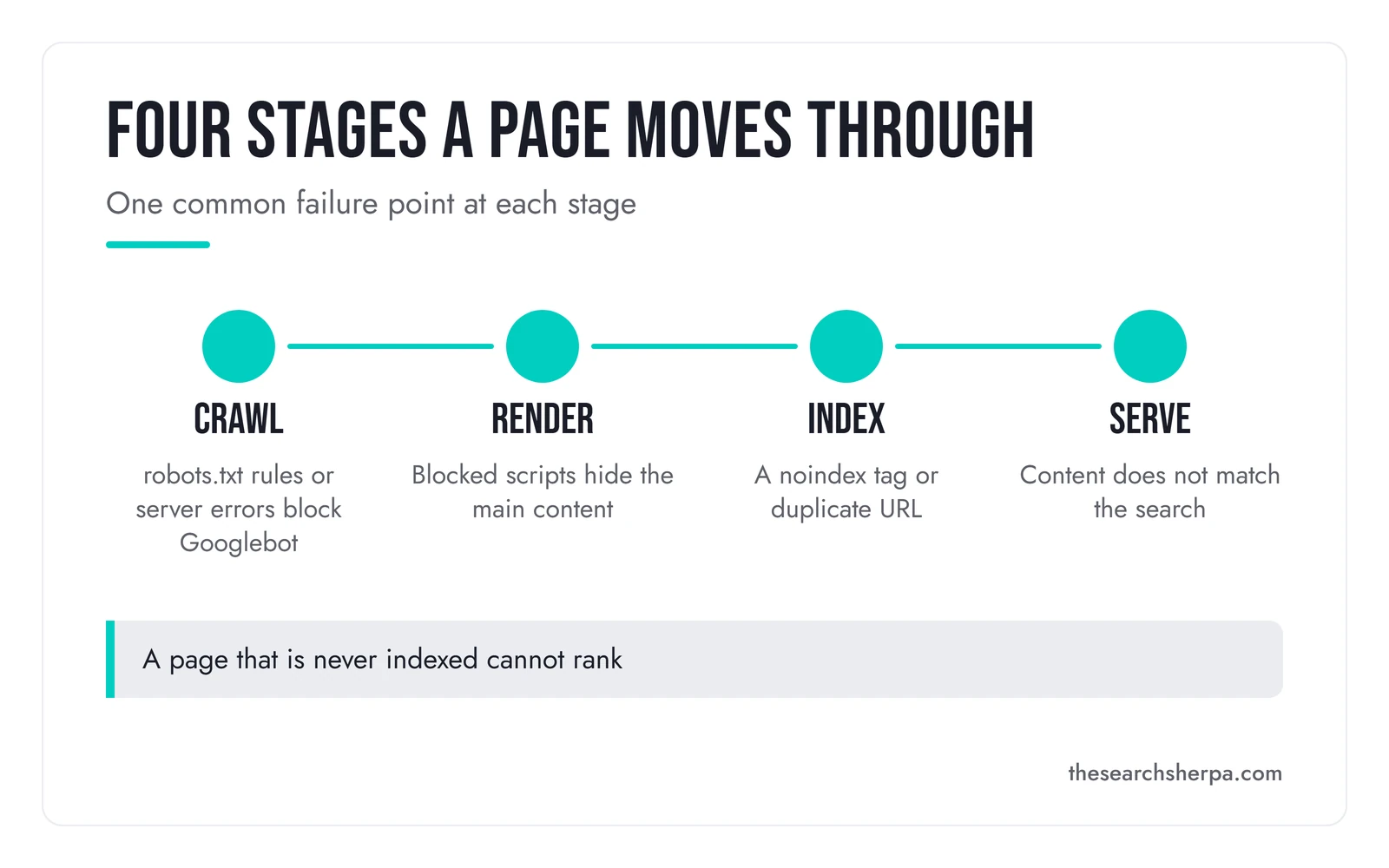
Rendering is part of Google’s crawl stage, and it is shown on its own here.
Crawl: can Googlebot reach the page?
Google warns that “Googlebot doesn’t crawl all the pages it discovered.” The crawl problems it names are server trouble, network issues, and robots.txt rules that block Googlebot. Pages with no internal links pointing to them are also hard to find.
A robots.txt file is often misunderstood. Google’s introduction to robots.txt says it “is not a mechanism for keeping a web page out of Google.” A page blocked there can still appear in results, just without a description. To keep a page out, Google says to use noindex or a password.
XML sitemaps help with discovery. Google’s sitemap overview says a sitemap helps search engines “crawl your site more efficiently.” It also says a properly linked site of “about 500 pages or fewer” may not need one. For platforms like WordPress, Google says the system has likely made a sitemap already. We still check what it lists.
Render: can Google see what a visitor sees?
Rendering is the step where Google runs a page’s code to see the finished page. Google’s JavaScript SEO basics say it “won’t render JavaScript from blocked files or on blocked pages.” Some sites send an almost empty page and build the content with JavaScript. Google must run that code before it sees the content, and the page waits in a queue first.
The usual fix is to send the important content in the first HTML response. Google still calls server-side rendering or pre-rendering “a great idea,” because it is faster for users and crawlers. It adds that “not all bots can run JavaScript,” so content that only exists after scripts run is easy to miss.
Google also indexes the phone version of the site. That is separate from rendering. Google’s mobile-first indexing guide says Google uses the mobile version of a site’s content for indexing and ranking. It tells owners to make sure the mobile site contains the same content as the desktop site.
Index: will Google keep the page?
Indexing is where Google decides whether to store the page. Google says not every page it processes will be indexed, and part of the decision is whether the page duplicates another one. Near-copy location pages are one example; SEO for multiple locations covers them. A single tag can also remove a page. Google’s guide to noindex says Google “will drop that page entirely from Google Search results” when it finds one.
The noindex rule has a catch. The page must not be blocked by robots.txt, or “the crawler will never see the noindex rule.” In WordPress, checking a single box under Settings, then Reading, asks search engines not to index the whole site. We walk through that check in why a business is not showing up on Google.
Duplicate URLs are the other big indexing issue. Google’s canonicalization guide lists causes such as HTTP and HTTPS versions of a site and sorting or filtering pages. It also says “some duplicate content on a site is normal.” The fix is to point every signal at one preferred URL. Google’s guide to consolidating duplicate URLs calls redirects and canonical tags strong signals and a sitemap a weak one. Even then, Google may choose a different canonical than you do.
Google Search Console shows the result. Its Page indexing report lists reasons such as “Crawled, currently not indexed” and “Duplicate without user-selected canonical.” Google adds, “Don’t expect every URL on your site to be indexed.” The goal it sets is to get the canonical version of every important page indexed.
Serve: is the page eligible to show?
Serving happens when someone searches. Google returns pages relevant to the query, judged by “hundreds of factors,” and it “doesn’t accept payment to rank pages higher.” An indexed page can still miss out when its content is irrelevant to the search or low in quality. Technical work cannot fix that part, which is why it runs alongside content.
Speed belongs here too. Google’s Core Web Vitals page sets the targets: Largest Contentful Paint within 2.5 seconds, Interaction to Next Paint under 200 milliseconds, and Cumulative Layout Shift under 0.1. Google says good scores align with what its core ranking systems “seek to reward.” Even so, its page experience guide says Google “always seeks to show the most relevant content, even if the page experience is sub-par.”
AI search follows the same path. Google’s guide to AI features says a page must be “indexed and eligible to be shown in Google Search with a snippet” to appear as a supporting link in AI Overviews or AI Mode. It also says no special schema or AI text file is needed. Our AI search optimization work builds on this technical floor.
What is included in technical SEO services
Here is the work, area by area. We check each row during the Roadmap and fix it during the retainer. Our SEO audit services page lists everything the Roadmap delivers.
| Area | What we check and fix | Why it matters |
|---|---|---|
| Crawl access | robots.txt rules, server errors, and CDN or hosting blocks | Google cannot crawl what it cannot reach |
| XML sitemaps | A list of live, indexable pages, submitted in Search Console | Helps Google find the pages you care about |
| JavaScript rendering | Main content and links in the HTML Google renders | Content that needs scripts can be missed |
| Mobile version | The same content on phone and desktop | Google indexes the mobile version |
| Indexing rules | noindex tags and the WordPress search engine visibility box | One setting can hide the whole site |
| Canonicals and duplicates | HTTP and HTTPS versions, sort and filter URLs, and open test copies | Google may keep the wrong copy of the page |
| Redirects | Permanent redirects from old URLs to the right new page | Links and bookmarks keep working |
| Speed and Core Web Vitals | Loading, responsiveness, and layout shift on the main templates | Visitors feel slow pages, and Google measures them |
| Structured data templates | Business markup that matches the visible page | Gives Google explicit clues about the page |
| Site architecture | Clear URLs and internal links to every important page | Pages with no links to them are hard to find |
| HTTPS | Every page loads securely, and HTTP addresses redirect | Mixed versions create duplicate URLs |
Structured data has rules of its own. Google’s structured data policies say, “Don’t mark up content that is not visible to readers of the page.” Breaking them can lead to a manual action, which costs the page its rich result eligibility. Google says it “doesn’t affect how the page ranks in Google web search.”
Some work sits outside this service. Titles, headings, page copy, and page-level schema are on-page work. Your map listing is Google Business Profile management. Describing your business as one consistent entity across the web is brand entity optimization.
Who technical SEO services fit, and who they do not
Who it fits
Common signs that something technical is in the way:
- Your pages are live, but Search Console shows many of them as not indexed.
- You redesigned the site, changed platforms, or moved domains, and calls from Google dropped afterward.
- The site is built with JavaScript or a page builder, and nobody has checked what Google renders.
- You have many near-identical pages, such as town pages, filters, or tag archives.
- Your pages miss Google’s Core Web Vitals targets in real-world usage data.
- A developer ships changes, but nobody checks them against how Google crawls and indexes.
When you do not need it yet
Many small sites do not need a technical program. In our judgment, a WordPress site with a working sitemap, clean links, and its pages indexed may need only a check.
If your goal is the map results, start with local SEO, though your site’s main pages still need to load and be readable. Local SEO covers your Google Business Profile, reviews, and local citations. If your pages are indexed but thin, better content will do more than any technical fix.
How the work runs
The work starts with a $2,000 Custom SEO Roadmap, which includes a complete technical site audit with a prioritized fix list. If you continue with us, the $2,000 is credited toward your first month of retainer work. Fixes then run in stage order, crawl first, because a later fix cannot help a page Google never reached.
- Diagnose. The Roadmap takes about four weeks. Its technical checkup looks for crawl blockers, page speed, and Core Web Vitals problems. We do not need your passwords or backend access for it.
- Prioritize. We order the fixes by stage and by the pages that bring in work, such as service and location pages. An indexing problem on a service page comes before a speed tweak on an old blog post.
- Fix. On WordPress, ask for the changes Rank Math can make, and for tickets for anything that belongs to your developer or host.
- Verify. A good provider confirms each fix in Search Console. The URL Inspection tool shows Google’s indexed version of a page, and the Core Web Vitals report uses real-world data from visitors.
The order matters. A page Googlebot never fetches is not stored as a normal result, so a speed fix on it would change nothing in search. A robots.txt block can still show the bare URL.
A useful report shows what changed, which URLs it touched, and what Search Console says now. Our guide on how to track local SEO performance explains the technical health floor we keep, and what your SEO agency should be showing you covers the rest.
Most local SEO shows measurable movement in about three to six months, depending on competition and the condition of your site. Some technical fixes show in Search Console sooner, once Google recrawls the pages they touch.
Site migrations and working with your developer
A migration is any change to where your pages live: a new domain, a new platform, a redesign that renames URLs, or a move to HTTPS. Google’s guide to moving a site tells owners to “expect temporary fluctuation in site ranking during the move.”
The core of the job is a URL map. Google says to “prepare a URL mapping from the current URLs to their corresponding new format,” then send each old URL to its match. Its redirects guide recommends “a permanent server-side redirect whenever possible,” which means a 301 or 308 status code.
Google also says to keep those redirects for as long as possible, generally at least one year, and to update internal links to the new URLs. After launch, it says to monitor traffic on both the old and new URLs. For a small to medium-sized site, Google says most pages can take a few weeks to move.

When we build the site ourselves through our custom WordPress design for SEO and speed service, we map your existing URLs and set 301 redirects before launch. We then review indexing and Search Console data in a 30-day post-launch review.
When you already have a developer, a good technical SEO provider works alongside them rather than replacing them. The provider brings the search checks: which URLs, what to change, and how to confirm it worked. Your developer keeps control of the code, the hosting, and the release schedule.
Ask for a written plan before any migration starts, from us or from anyone else. It should list every old URL, its new address, the redirect type, and who checks it after launch.
What technical SEO services cost
Small local businesses generally invest $1,000 to $3,000 a month for map pack visibility and local search, and our retainers pay for continuous technical optimization along with content and link building. The first step is a one-time $2,000 Custom SEO Roadmap, credited toward your first month. Packages below $500 a month cannot sustain the work.
Cost depends on your site, your competition, and your goals. A small WordPress site with a sitemap and clean URLs needs far less technical work than a JavaScript site with a long list of filter pages. A coming migration adds work, and so does a site that has already lost pages from the index.
| Step or tier | Price | What it covers |
|---|---|---|
| Custom SEO Roadmap | $2,000 one time, credited toward your first month | About four weeks, including a complete technical site audit with a prioritized fix list |
| Local business retainer | $1,000 to $3,000 a month | Map pack visibility and local search, the band our pricing page gives small local businesses |
| Mid-market company | $3,000 to $8,000 a month | Multi-region campaigns, including ongoing technical optimization |
| Under $500 a month | Not a tier we offer | Our pricing page says this “cannot sustain the labor-intensive work required for legitimate organic growth” |
These figures come from our SEO pricing page. It also describes project-based work for one-time technical audits and site migrations, usually followed by a retainer. If you want a diagnosis on its own, see what an SEO audit costs.
We do not promise rankings, lead counts, or map placements, because no honest provider can. Google itself does not promise to crawl, index, or serve any page. We do not use long-term lock-in contracts.
Frequently asked questions
What is the difference between SEO and technical SEO?
SEO is all the work that helps a business show up in search, and technical SEO is one part of it. Technical SEO fixes the site itself so Google can crawl, render, and index its pages. The rest of SEO covers the content on each page and the trust a business earns from other sites and its Google Business Profile.
What does technical SEO do?
Technical SEO removes the problems that stop Google from reaching, reading, and storing your pages. It fixes robots.txt rules, sitemaps, JavaScript rendering, noindex tags, duplicate URLs, redirects, speed, and structured data templates. It does not write content or earn links, but it lets the content and links you have count.
What are the three types of SEO services?
We group SEO work into three kinds: on-page, off-page, and technical. On-page work covers the words, headings, and titles on each page. Off-page work covers links, mentions, and reviews from other sites. Technical work covers the site itself: crawling, rendering, indexing, speed, and redirects. Local SEO and AI search optimization draw on all three.
How much should I pay for SEO services?
Small local businesses generally invest $1,000 to $3,000 a month for map pack visibility and local search, and mid-market companies $3,000 to $8,000 a month. Packages below $500 a month cannot sustain the work that organic growth takes. With us, the first step is a one-time $2,000 Custom SEO Roadmap, credited toward your first month if you continue.
Is SEO dead now with AI?
No. Google says a page must be indexed and eligible to show in Google Search with a snippet before it can appear as a supporting link in AI Overviews or AI Mode. Google also says no special schema or AI text file is needed to appear there.
What does an SEO company do?
An SEO company improves how a business shows up in search. Google’s own list of what an SEO can offer includes reviewing site content or structure, technical advice on hosting, redirects, and JavaScript, content development, and keyword research. Google adds that advertising with Google has no effect on a site’s presence in its search results.
How long does technical SEO take to show results?
Most local SEO shows measurable movement in about three to six months, depending on competition and the condition of your site. A single fix can show in Search Console sooner, once Google recrawls the page. After a site move, Google says most pages on a small to medium-sized site can take a few weeks to move.
How to start
Start with your site address and what has changed on it lately, such as a redesign, a new host, or pages that dropped out of Google. We will tell you whether a technical program makes sense or whether a smaller fix will do. Your site, your content, and your data always belong to you.
See how we price SEO and the Custom SEO Roadmap, or contact The Search Sherpa to talk through your site. You can also call (217) 579-8791. No pressure, and no lock-in contract.
Explore This Topic

Hiring an SEO Consultant Chicago Businesses Can Trust

On-Page SEO Services: Improving the Pages You Already Have

Landscaping SEO for Landscapers: Two Kinds of Buyer, Two Kinds of Search

SEO Audit Services: A Prioritized Plan, Not a List of Problems
Multi-Location SEO: Local SEO for Businesses With Two or More Locations
Join Over 400,000 Entrepreneurs Getting Our Weekly Newsletter
Recent Posts
October 8, 2026
How to choose an SEO consultant in Chicago: consultant, agency, or freelancer, a decision tree, a vetting checklist, red flags, and rates in
October 8, 2026
On-page SEO services improve the pages you already have: titles, headings, copy, links, alt text, and schema. What is included, how it runs,
October 8, 2026
Landscaping SEO builds the pages and Google Business Profile work behind lawn care contracts and design-build projects. What it includes and costs.