

By Jeremy Bengtson, founder of The Search Sherpa.
The page you already have is often the best place to start. On-page SEO services improve the pages on your site, one page at a time. Each page is matched to what customers search. Then its title, headings, copy, links, images, and schema are tuned to answer that search clearly.
Many small-business sites already have the right pages. The trouble is often inside them. The title shows only the business name. The main heading is a slogan. The copy never answers what the customer typed. This guide takes one page apart and explains what the work includes, how it runs, and what it costs.
What are on-page SEO services?
On-page SEO services improve single pages on your site so each one matches a real search and answers it well. The work covers titles, meta descriptions, headings, copy, internal links, image alt text, and page-level schema. It does not cover site-wide technical repairs or links from other sites.
Google’s Search Essentials describe the core of the job: “Use words that people would use to look for your content, and place those words in prominent locations on the page, such as the title and main heading of a page, and other descriptive locations such as alt text and link text.” The rest is making the page worth reading once someone arrives.
Technical SEO covers the whole site, such as crawling, speed, and site moves. Off-page SEO covers links from other sites, reviews, and your Google Business Profile. On-page work is the part you can see and edit on each page.
All three belong to one visibility system. Our homepage puts our side of it plainly: “We improve the website, service pages, internal links, schema, local profiles, content, and conversion paths.” Our local SEO services guide counts “on-page work on service and location pages” among the services local SEO usually includes.
The anatomy of one optimized page
Picture one service page, such as a page for water heater repair. Every part of it has a job. Two parts can show up in Google before anyone clicks: the title and the description. The rest shapes what a visitor reads and what Google understands. The diagram below labels each part.
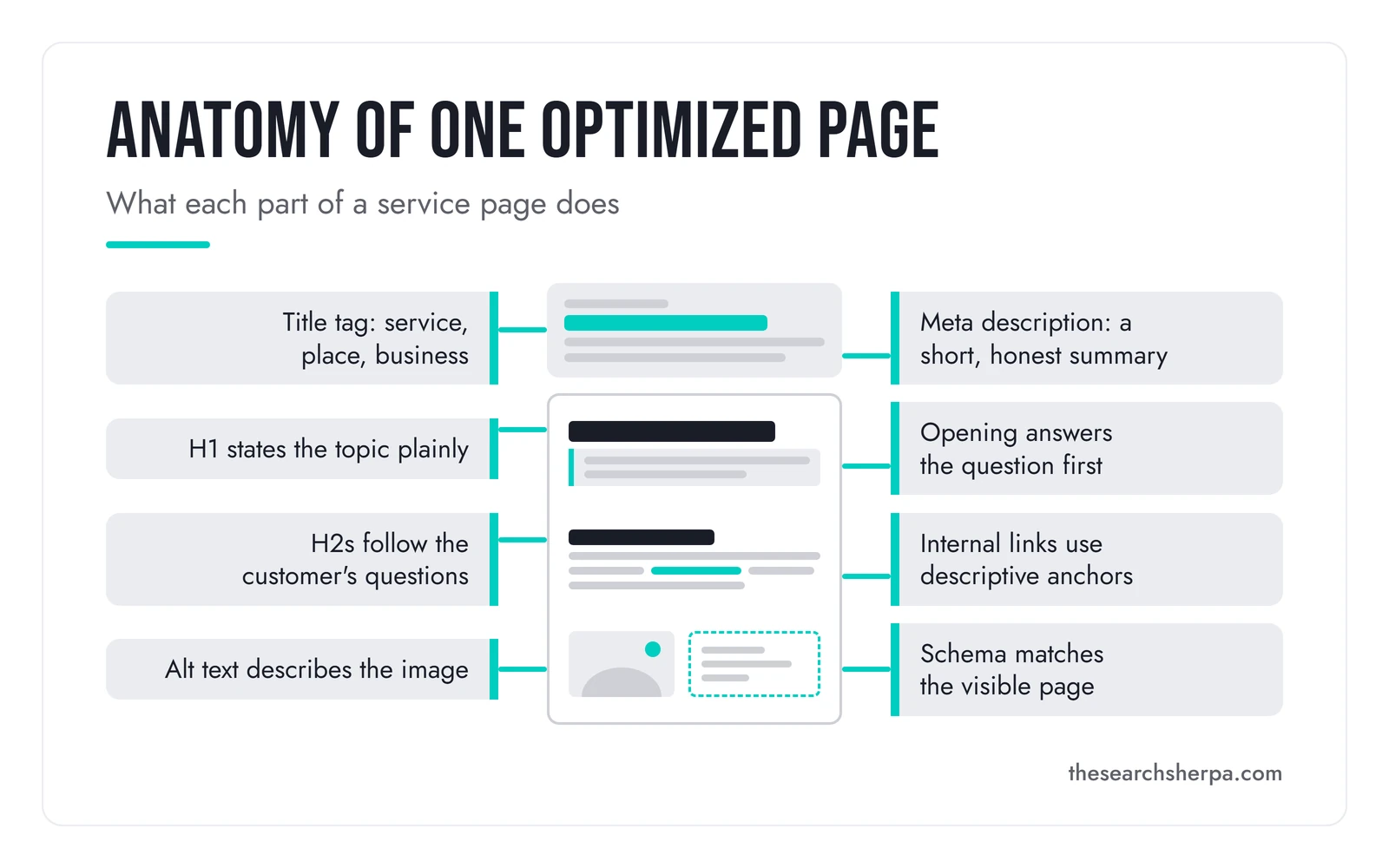
This table lists what on-page SEO services include, part by part.
| Part of the page | What the work does |
|---|---|
| Search intent and keyword map | Matches each page to one main search, so your pages do not compete |
| Title tag | Names the service, the place you serve, and your business |
| Meta description | Gives a short, honest summary that helps a searcher decide to click |
| H1 and headings | States the topic plainly, then follows the customer’s questions |
| Opening and body copy | Answers the main question first, then gives the details |
| Internal links | Connects related pages with link text that says where each link goes |
| Image alt text and filenames | Describes what each image shows |
| Page-level schema | Adds structured data that matches what the page visibly says |
| Keeping the page current | Updates facts, services, hours, and areas when they change |
Site-wide crawl fixes, template speed, and site moves are technical jobs, not on-page work. A one-time audit is separate too. An audit finds problems, and on-page work fixes them page by page. To price an audit first, see what an SEO audit costs.
Each part of the page, and what good looks like
Google publishes guidance for nearly every part of a page. Here it is in plain words.
Title tags that name the service and the place
The title tag is the clickable headline in Google’s results. Google’s title link guidance asks for a descriptive, concise title on every page. It also says plainly: “Avoid keyword stuffing.” Google does not always show your title as written. It says it uses “a number of different sources” to build the title link, including the headings on the page.
Our guide to writing local title tags and meta descriptions says, “A good local title tag names the service, the place you truly serve, and your business.”
Meta descriptions that sum up the page honestly
The meta description is the short summary that may appear under your title. Google’s snippet guidance says it “primarily uses the content on the page” to write that summary. It may use your meta description “when it describes the page better than other parts of the content.” Our title tag guide notes, “Google has said it does not use the meta description to rank pages.”
Each page needs its own description. Google warns, “Identical or similar descriptions on every page of a site aren’t helpful.” Many pages skip this step. The 2025 Web Almanac, a large study of pages across the web, found meta descriptions on 67.7% of desktop pages. That leaves about a third of the pages it measured with none.
Headings that follow the customer’s questions
The H1 is the main heading at the top of the page. Google’s helpful content guidance asks, “Does the main heading or page title provide a descriptive, helpful summary of the content?” Replacing slogan H1s with accurate H1s is one of the safest on-page edits you can make.
The H2 and H3 headings below it split the page into sections. Google’s SEO Starter Guide says to “provide headings to help users navigate your pages.” What matters is that each heading tells a reader what the section answers. For the WordPress side, see our guide to heading structure in WordPress with Rank Math.
Internal links with descriptive anchor text
Internal links connect your pages to each other. Google’s link guidance says it “uses links as a signal when determining the relevancy of pages and to find new pages to crawl.” It adds, “Every page you care about should have a link from at least one other page on your site.”
The words you click matter too. Google says, “Good anchor text is descriptive, reasonably concise, and relevant to the page that it’s on and to the page it links to.” A link that only says “click here” tells no one anything. A link that says “water heater repair in Frankfort” tells both the reader and Google where it goes.
Image alt text that describes the image
Alt text is a short description of an image. Google’s image guidance says, “The most important attribute when it comes to providing more metadata for an image is the alt text.” It also warns, “Avoid filling alt attributes with keywords.” Its example alt text reads “Dalmatian puppy playing fetch.”
So write what the photo shows, not a list of services. Google also suggests you “use filenames that are short, but descriptive.”
Page-level schema that matches the page
Schema is structured data, a block of code that labels facts on the page for search engines. On a service page, we write JSON-LD schema for LocalBusiness, Service, and FAQPage. The rules are strict. Google’s structured data policies say, “Your structured data must be a true representation of the page content.” They add, “Don’t mark up content that is not visible to readers of the page.”
What schema earns has changed. Google’s Search Central updates log says, “The FAQ rich result feature is no longer shown in Google Search results.” That change took effect in May 2026. Schema still helps Google understand what a page is about. It is not a shortcut to special results.
Writing copy that answers the customer’s question
Good on-page copy answers the customer’s question first. The question goes in the heading, and the answer goes in the first two sentences below it. Then the page adds the details a customer needs to choose you.

Copy is where many service pages fall short. They describe the company and rarely answer the question that brought the visitor. Google calls the goal people-first content: “content that’s created primarily for people, and not to manipulate search engine rankings.”
The best source for that copy is usually you. You know the questions customers ask on the phone and at the counter. A good provider talks with you, and with the staff who answer the phone, before writing a word. Those conversations become headings, answers, and details that only your business can give.
We write pages and articles that answer what your customers are actually searching for, not filler. On our SEO content marketing strategy page, we describe placing “concise, 40-to-60-word authoritative answers immediately beneath your headings.” That page also covers content programs and topic clusters.
Length is not the goal. Google’s Starter Guide says “there’s no magical word count target.” A page should be as long as the answer needs.
Stuffing is the other trap. Google’s spam policies list “Blocks of text that list cities and regions that a web page is trying to rank for.” A service page should name the places you truly serve, in plain sentences, and stop there.
We use AI to speed up research and organize information. We do not let it replace human judgment. Every output is reviewed by a human strategist before implementation.
When on-page SEO work fits, and when it does not
On-page work fits best when your site has the right pages but they do not perform. These are common signs.
- Your service pages exist, but their titles show only the business name.
- Several pages target the same service with nearly the same copy.
- Your main headings are slogans, not the services you sell.
- Important pages have few or no links from the rest of your site.
- Images carry camera filenames and no alt text.
- Facts on the page, like hours, services, or service areas, are out of date.
It is not the right first step for every site. If Google cannot crawl or index your pages, fix that first with site-wide technical SEO. On-page edits cannot help a page Google never sees. If the site is very old or hard to edit, a rebuild may make more sense. We build on WordPress. See our page on custom WordPress design built for SEO.
Some needs sit outside what we sell. The Search Sherpa does not sell paid ads management, Local Services Ads, social media management, or email marketing. If one of those is your main priority, a specialist in that channel is a better fit.
You may not need outside help at all. Google’s guide on whether you need an SEO says, “If you run a small local business, you can probably do much of the work yourself.” Not everything needs to be done by us. We can build a plan that covers what we do and what you keep doing yourself.
How on-page work runs, from the first page to upkeep
Every engagement begins with a Custom SEO Roadmap. Its keyword database lists the service terms and places to target, prioritized by intent. Its ideal site map shows how your pages should fit together. You see the full plan before any work begins. After that, the work runs in four steps.
- Map each page to one search. We use Semrush, Google Search Console, and competitive analysis. Together they build a keyword map by search intent, service line, and place.
- Improve each page. We audit your page structure, improve service pages, set up proper heading hierarchy, and strengthen internal links. Every page targets a specific search intent.
- Measure. We track visibility, calls, form submissions, rankings, page performance, and search behavior. Monthly reports connect metrics to business outcomes.
- Keep pages current. We review search behavior, update content, and improve over time.
Google’s Starter Guide says to “Check in on previously published content and update it as needed, or even delete it if it’s not relevant anymore.” Keeping a page current does not mean changing its date. Google asks, “Are you changing the date of pages to make them seem fresh when the content has not substantially changed?” Change the date when the content really changes.
You work directly with the person doing the work. A small team handles production tasks like content drafting, image production, and report assembly. Strategy and audit findings stay with the founder.
Reports should show the work itself. A good provider lists every page it touched, by address, with a short note on what changed. That is one of the points in our guide to what your SEO agency should be showing you. We work in Google Search Console, Google Analytics, Semrush, and Rank Math. We will tell you which tool a number came from.
What on-page SEO services cost
Our pricing page does not list a per-page price. Every engagement begins with a $2,000 Custom SEO Roadmap. Cost depends on your site, your competition, and your goals.
Here is what our SEO pricing page says. Small local businesses generally invest $1,000 to $3,000 monthly for map pack visibility and local search. You pay a predictable monthly fee for continuous technical optimization, content production, and link building. The Local Businesses tier also lists “service-plus-city landing pages” and “targeted content.” Those are the kind of pages on-page work improves.
The roadmap comes first and takes about four weeks. If you hire us to carry out the plan, the $2,000 is credited fully toward your first month. If you would rather hand the plan to your own team, it is yours to keep.
Need only a specific set of pages? Our digital marketing services page lists project-based website work as a “One-time investment for a new WordPress website build, redesign, or specific set of pages.”
Be careful with very cheap offers. SEO packages priced below $500 per month cannot sustain the labor-intensive work required for legitimate organic growth. Producing a single in-depth service page or article requires research, writing, editing, and schema markup.
Showing up in Google’s regular results is free. Google says, “It doesn’t cost any money to appear in Google Search results, no matter what anyone tries to tell you.” What you pay for is the work. We do not use long-term lock-in contracts. Your site, your content, and your data always belong to you.
Frequently asked questions
How much does on-page SEO cost?
Cost depends on your site, your competition, and your goals. Cost factors include website size and condition, local competition, the number of services or locations, technical issues, and content gaps. Small local businesses generally invest $1,000 to $3,000 monthly for map pack visibility and local search. Every engagement begins with a $2,000 Custom SEO Roadmap. SEO packages priced below $500 per month cannot sustain the labor-intensive work required for legitimate organic growth.
Is SEO still worth it in 2026?
Google answers a close version of this question. Its guide to generative AI features asks, “Is SEO still relevant for generative AI search?” Google’s answer is yes. It says those features are “rooted in our core Search ranking and quality systems.” We cover answer engine optimization in a plain guide of its own.
Which tool is best for on-page SEO?
No single tool does it all, and Google points to its own first. Its guidance on third-party SEO tools says “we strongly encourage using our first-party tool, Google Search Console.” Google Search Console is “a free service offered by Google that helps you monitor, maintain, and troubleshoot your site’s presence in Google Search results.” Its URL Inspection tool “provides information about Google’s indexed version of a specific page.” We work with professional tools like Semrush, Rank Math, and Google Search Console. Google adds, “Third-party tools don’t have access to our internal ranking data.”
What is on-page SEO vs off-page SEO?
On-page SEO is work on the page itself: its title, headings, copy, links, images, and schema. Off-page SEO is what happens elsewhere, such as links from other sites, mentions, reviews, and your Google Business Profile. Google’s own title link guide refers to off-page content, such as anchor text from other sites. Our guide to how SEO, local SEO, and a Google Business Profile differ covers how links and mentions from other sites earn trust.
How long does on-page SEO take to show results?
When you change a title, Google “has to recrawl and reprocess the page to notice updates.” Its title link guide says that “may take a few days to a few weeks.” Most local SEO shows measurable movement in about three to six months, depending on competition and the condition of your site. We do not promise rankings, lead counts, or map placements, because no honest provider can.
Can I do on-page SEO myself?
Most business owners can write good titles and descriptions for a handful of pages. Start with titles, main headings, and one clear answer near the top of each page. Our title tag guide includes a free Claude skill, the Local Title and Meta Optimizer. The free skill drafts a change sheet. You approve every change before anything goes live.
Should I fix my old pages or write new ones?
Start with the pages you already have, as long as each one serves a real service or place. Improving a page keeps its address and any links it has already earned. Write a new page when a service or a place you truly serve has no page at all.
How to start with on-page SEO
Start with one question. Which page should bring you the most calls, and does it answer what those callers search? Open that page and check each part against the anatomy above.
If you want a second set of eyes, start with a conversation. We will look at where you stand and what comes next. The Search Sherpa is a founder-led local SEO consultancy in Mokena, Illinois, and you work directly with Jeremy Bengtson. Our homepage describes the service area: “The service area includes Mokena, Frankfort, New Lenox, Tinley Park, Orland Park, Homer Glen, Manhattan, Lockport, and Joliet.”
No contracts. Clients stay because the work earns it. To compare your options, see how our pricing works, or connect with us to talk about your pages. You can also call (217) 579-8791.
Explore This Topic

Hiring an SEO Consultant Chicago Businesses Can Trust
On-Page SEO Services: Improving the Pages You Already Have

Landscaping SEO for Landscapers: Two Kinds of Buyer, Two Kinds of Search
SEO Audit Services: A Prioritized Plan, Not a List of Problems
Multi-Location SEO: Local SEO for Businesses With Two or More Locations
Join Over 400,000 Entrepreneurs Getting Our Weekly Newsletter
Recent Posts
October 8, 2026
How to choose an SEO consultant in Chicago: consultant, agency, or freelancer, a decision tree, a vetting checklist, red flags, and rates in
October 8, 2026
Landscaping SEO builds the pages and Google Business Profile work behind lawn care contracts and design-build projects. What it includes and costs.
October 8, 2026
SEO audit services that prioritize every fix by impact and effort. Nine assets in four weeks for $2,000, credited to your first month